Harness exchange spans several information layers. An electrical connection, a topology, a physical wire, and a routed path are related but not interchangeable. When information returns from MCAD, confirm which value changed and whether it still refers to the intended connection and configuration.
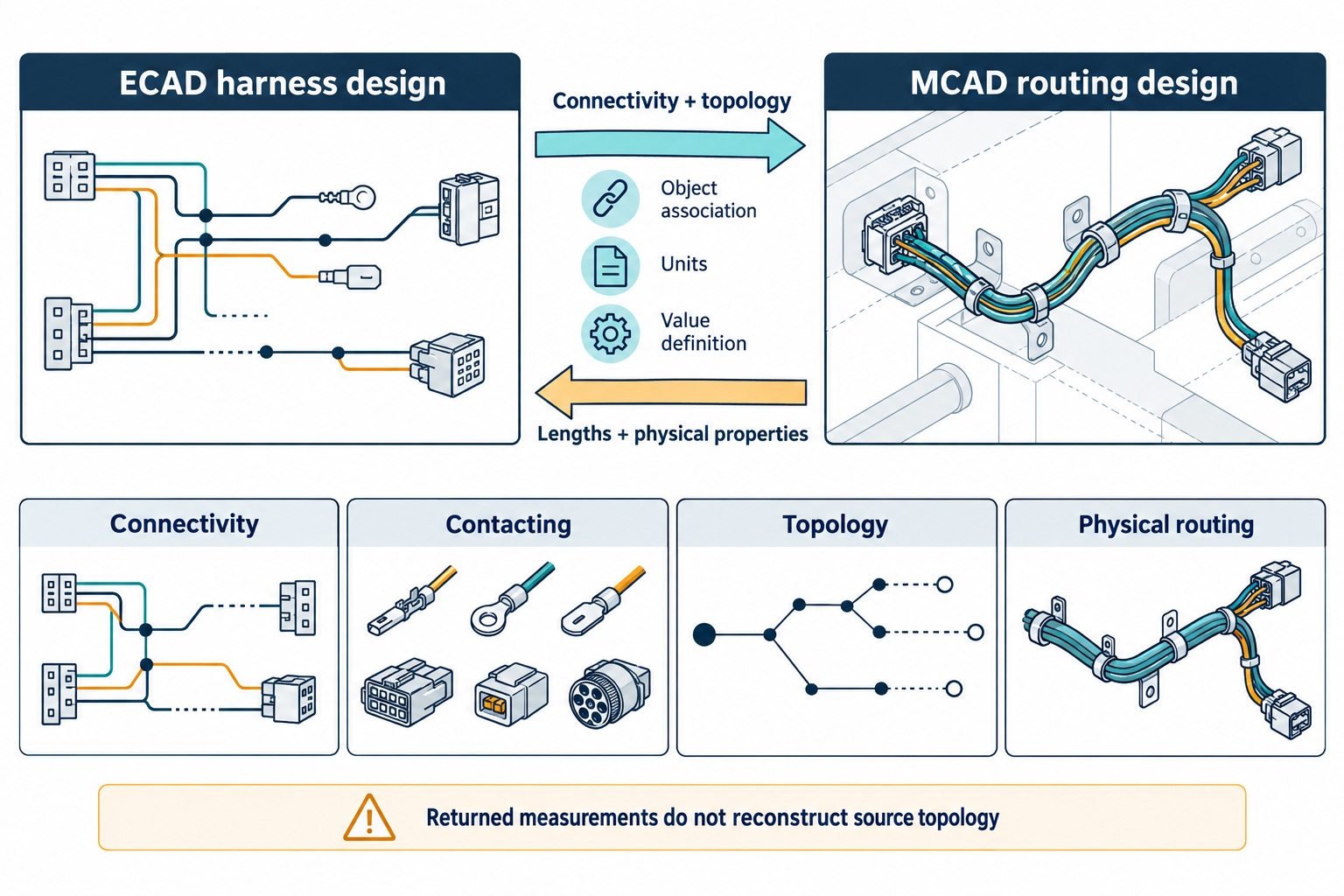
Keep the layers distinct
| Information layer | Questions for the handoff |
|---|---|
| Connectivity | Which terminals, pins, or network ports are connected, and in which configuration? |
| Contacting | Which wire end meets which terminal, cavity, or connector reception? Is any description intentionally incomplete at this design stage? |
| Topology | Which connection points and wires or cables form the harness structure? |
| Wire composition | Which wire or cable element is intended, and are reused specifications distinguished from their particular occurrences? |
| Routing | Which ordered physical path or route variant is represented, and what constraints remain? |
| Returned data | Which lengths or physical properties came back, with what definitions, units, and object associations? |
The Vehicle Electric Container (VEC) model helps explain these distinctions. Its net specification describes abstract electrical links without deciding the concrete splice, connector, topology, or physical conductors. Separate contacting and routing concepts describe additional relationships. The VEC implementation guidance describes ordered route segments and context-specific wire elements; it does not establish that a particular ECAD-MCAD product maps those structures.
ECAD harness design ── connectivity and topology ──> MCAD routing design
ECAD harness design <── returned lengths and physical properties ── MCAD routing design
The arrows describe the documented Altium CoDesigner example below, not a universal exchange direction or a complete harness payload. A separate KBL/VEC mapping guideline is marked under review, has unfinished sections, and limits its mapping discussion to structure rather than detailed attributes. Use these VEC resources to frame information questions, not as a complete conversion recipe.
Treat direction as part of the contract
Altium documents one bounded CoDesigner harness flow in which ECAD sends connectivity and topology to MCAD. The advanced guidance limits the exchanged model to named harness object types and describes physical lengths of wires, cables, or bundle segments returning to an ECAD harness layout. It does not describe those returned measurements as a reconstruction of the source topology.
Length meaning can depend on the MCAD implementation and configuration. For example, Altium describes SOLIDWORKS wire or cable length as a cutting-length value with a configurable connector-interior allowance; a bundle-segment value is calculated along stored route points. Such values are not universal manufacturing specifications. Confirm their definition, unit, calculation, and owner before using them downstream.
The product page’s listed prerequisites and feature availability are not proof that a team’s installed releases, extensions, licenses, or server configuration support the required operation. Verify those conditions for the actual route. Saving a project, triggering an automatic push, or seeing a notification also does not establish that the receiver applied or validated the returned data.
Use a directional receipt checklist
Before exchange, record the harness identity, source revision, configuration, sender and receiver, software and schema versions, and the information expected in each direction. At receipt:
- Reconcile connector, cavity, wire, cable, splice, and from-to associations against the intended configuration.
- Check topology and route order where the task depends on physical paths.
- Associate each returned length or geometry value with its source object, unit, and definition.
- Separate software routing or representation checks from physical fit, supplier requirements, and manufacturing acceptance.
- List unsupported objects, unresolved mappings, and any values requiring manual confirmation.
Do not infer complete KBL/VEC conversion, cross-tool preservation, physical feasibility, or a supplier-ready harness from an information model or feature description. If the recipient needs equipment or inspection results, use the separate manufacturing and quality handoff guidance.