A USDZ package has layout and path-resolution rules that affect whether its scene can be interpreted in another environment. These rules describe the package format and OpenUSD behavior; they do not establish that a particular application accepts the package or resolves every referenced asset.
Check the package layout
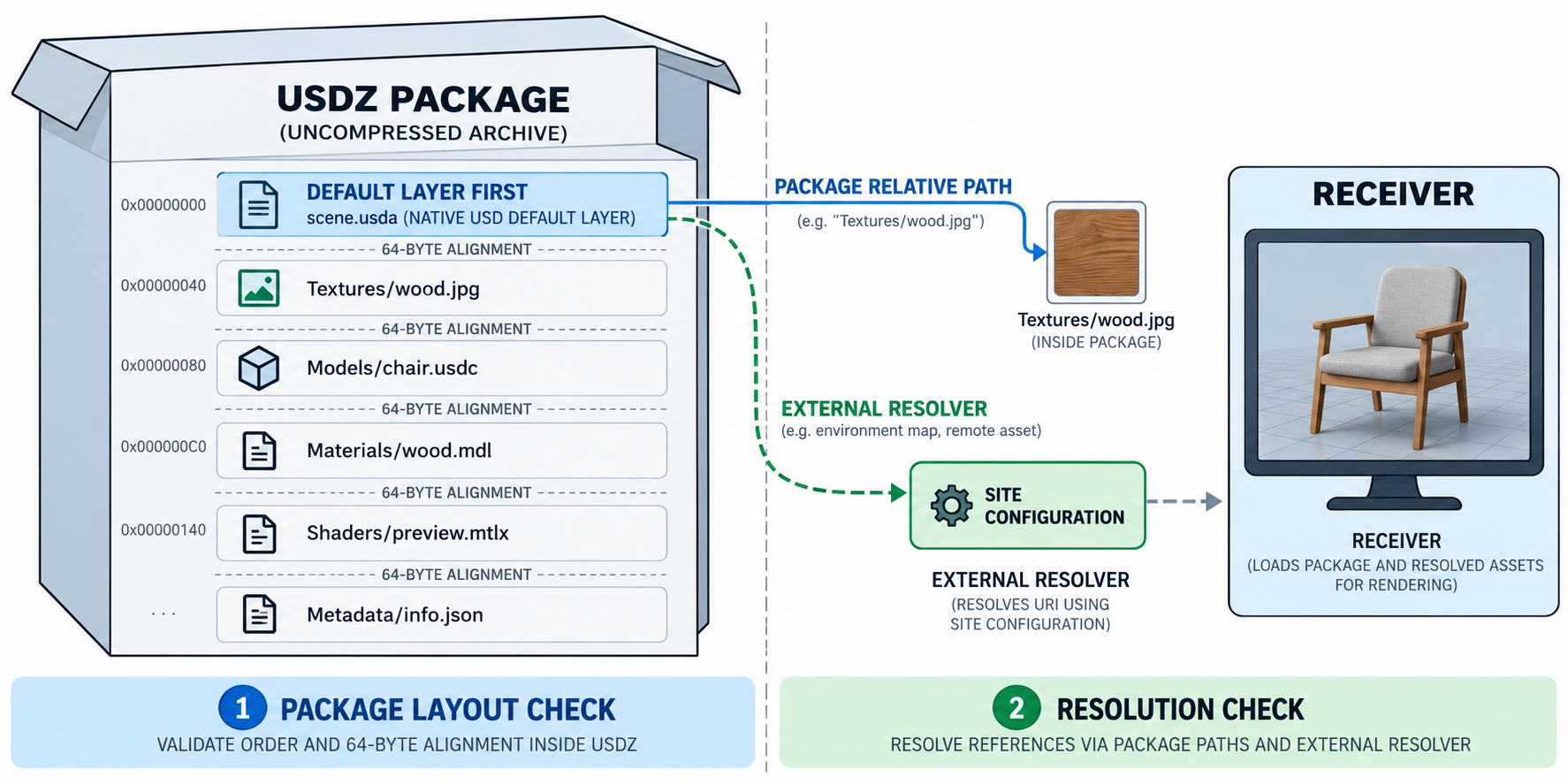
The OpenUSD USDZ specification defines version 1.3 as an uncompressed, unencrypted ZIP archive. Every file in the package must begin at an offset that is a multiple of 64 bytes. If the package is to be opened as a USD stage or referenced as a whole, its first file must be a native USD file. This file is the package’s Default Layer and acts as its root when the package is opened as a whole.
The first-entry rule is specific to whole-package opening or referencing. It does not mean that a package listing by itself proves the scene’s composed result or confirms that all referenced resources are present.
Understand path resolution
USD asset paths can be interpreted through resolvers and file-format plugins. The same path string may therefore depend on resolver configuration or plugins available at the receiving site.
For USDZ, an anchored context-dependent path is resolved within the package or remains unresolvable. A search-context path is tried first relative to the layer’s package context, then relative to the package’s Default Layer, and finally through the installed asset resolver. A path that reaches an external resolver can still depend on site-specific configuration. Nested package-relative paths also depend on a resolver chain that supports the required resolution.
These rules explain why “it is inside a USDZ” and “the receiver can resolve it” are separate claims. Record external paths, resolver or plugin assumptions, and the environment used for the actual delivery check.
Use tools as checks, not acceptance evidence
OpenUSD’s usdzip utility can package explicit files or recursively localize referenced assets, list package contents, and optionally validate during packaging. usdchecker can validate USDZ contents, with stricter options for particular web-delivery requirements. The specification also describes USDZ as read-only: to edit its contents, unpack it, edit the constituent files, and package it again.
These utilities help inspect or construct a package. Their availability or a successful tool check does not show that a named receiver has the necessary resolver configuration, accepts the package for its intended task, or interprets every layer and asset as expected.
Delivery checklist
Before handing off a USDZ package, record or verify:
- the USDZ specification version and the package’s first entry;
- whether each packaged member starts at a 64-byte-aligned offset;
- the files and references inside the package, plus any external paths;
- the resolver, plugins, and URI or path assumptions the scene needs;
- package-tool output and the result in the actual receiving environment; and
- the operation the receiver must perform and its acceptance checks.
Do not infer CAD authoring, parametric editability, or a specific product’s USDZ support from package conformance alone. For the broader file, container, and dependency model, see Containers, Packages, and External Resources; for implementation-specific mapping limits, see What a CAD Translator Actually Has to Do.