Recognition and reconstruction can make an imported shape easier to change, but neither should be described as extracting the original feature tree by default. Start by separating the received geometry from the authoring definition that may have produced it.
This article focuses on imported solids, surfaces, and boundary-representation (B-rep) geometry. If the input is a scan or mesh, first choose whether to keep it as a reference, edit its mesh representation, convert it, or rebuild new CAD from it; see From Scan or Mesh to Editable CAD.
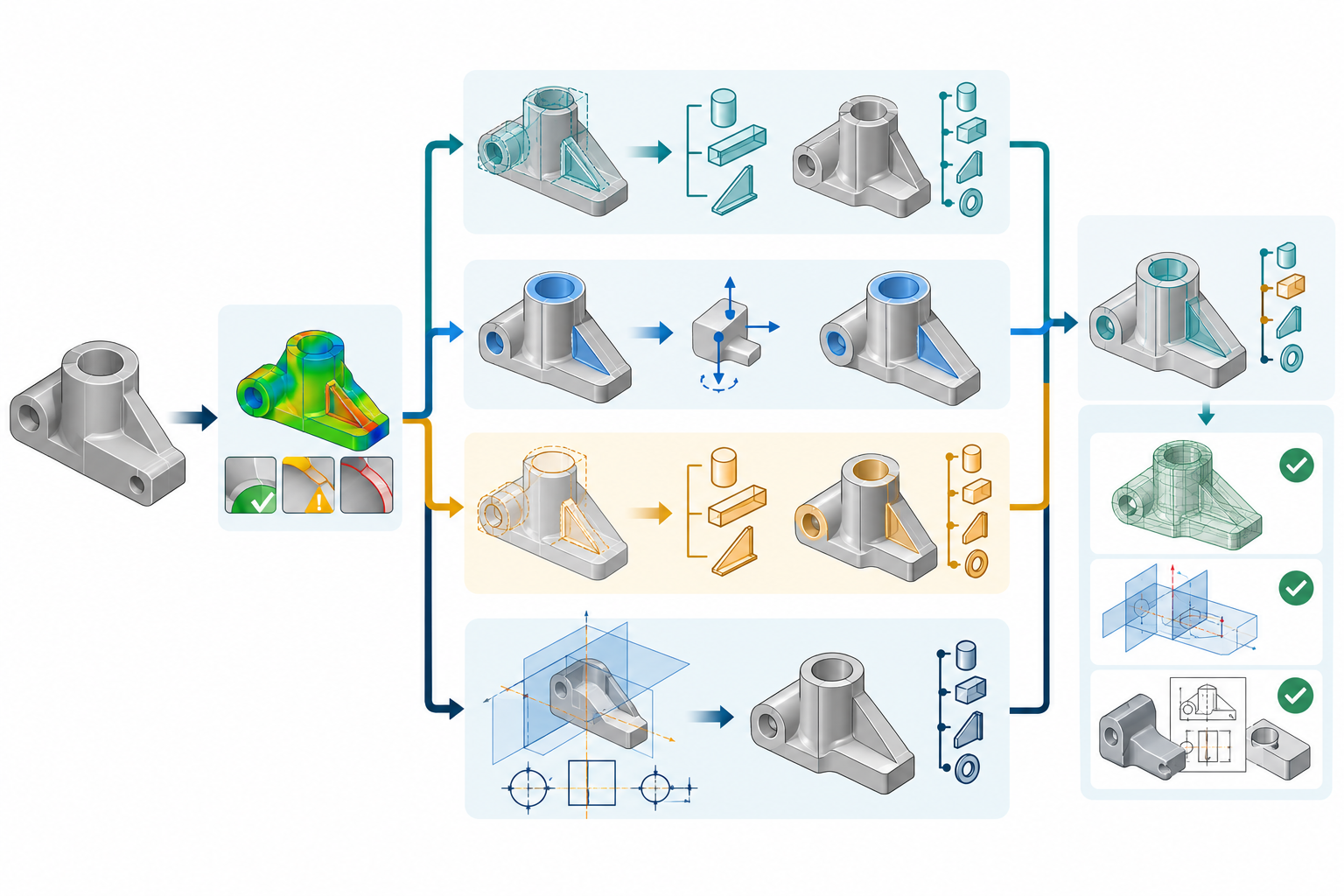
The recovery problem
An imported boundary representation contains faces, edges, surfaces, solids, and topology. A source authoring definition may additionally contain sketches, constraints, parameters, feature order, equations, references, configurations, and rebuild rules. The same visible shape can result from many different definitions. A destination tool therefore has to infer or recreate control; it cannot assume that the source intent is present just because the shape is valid.
Before recovery, preserve the received file and record its source, route, release, units, import options, and any translator or import log. Decide which change must work. “Make it parametric” is not a test; “change this hole diameter and preserve the mounting pattern in the released part” is.
Feature recognition
Feature recognition searches imported geometry for patterns that can be represented by destination-native features. In Creo Parametric 12, the documented process is semiautomatic and works on candidate geometry in imported solid parts. The listed classes include holes, extrusions, chamfers, fillets, rounds, slots, and patterns. Creo analyzes and removes imported geometry before replacing it with equivalent Creo Parametric features; it validates that the new features do not change the model geometry and warns when they do.
The qualification is important. “Equivalent” in that product description is about the destination feature created by the operation, not proof that it has the source feature’s name, order, constraints, references, or design rationale. The documentation also describes failure boundaries: if surface removal fails, chamfers and fillets cannot be created in that process, while holes and extrusions may be created on the existing surface without removing the original geometry.
SOLIDWORKS 2026 FeatureWorks provides another bounded example. Its overview says recognized features in an imported solid body can have editable definitions and that underlying sketches can be edited for sketch-based features. The documented inventory includes extrudes, revolves, chamfers, fillets, ribs, drafts, holes, lofts, shells, sweeps, volume features, patterns, sheet-metal features, sketch patterns, and multibody-part context. It also identifies limits such as partial imprints that cannot be recognized and unsupported pattern-of-pattern creation. A listed class is not a success rate for an arbitrary body.
Recognition can also change the identity and state that downstream work depends on. SOLIDWORKS 2026 documents staged FeatureWorks recognition: a part can retain imported geometry and recognized features, be saved, and continue recognition later. It also warns that pre-recognition feature names are not retained—for example, a named hole can receive a new feature name—and limits some intermediate-stage commands to the features currently shown in the recognition stage. Preserve the resulting feature names, references, and stage when they matter to later edits.
Creo Parametric 13 documents two concrete recognition failure branches. If replacing imported geometry changes mass properties, the Remove feature cannot be created and Creo displays a warning. If the replacement cannot be placed, Failure Diagnostics and RESOLVE FEAT offer reference rerouting or cancellation. Rerouting a reference can resolve placement, but it does not demonstrate source-history or design-intent equivalence.
Direct editing
Direct editing changes selected geometry without requiring the destination to reconstruct a complete feature history. Autodesk describes Inventor Direct Edit as adjusting the size, shape, or location of model features by manipulating geometry. It is useful for imported base parts, as-built changes, or controlled alternatives where changing the full dependency chain would create unwanted effects.
Creo Flexible Modeling similarly documents moving and changing imported geometry and recognizing patterns or symmetry so a modification may propagate to other members. These operations provide destination-side geometric control. They do not establish recovery of source sketches, constraints, feature order, or upstream authoring intent.
Direct editing is a good fit when the required operation is bounded and the resulting geometry is what downstream work needs. It is a weak fit when the recipient must repeatedly change the design through shared equations, constraint logic, configurations, or source-owned updates.
Autodesk Fusion separates recognition from modeling mode. Its Find Features tool is available only in Direct Modeling Mode and can create browser features from selected solid geometry, including imported models, without changing the body’s geometry; found features can then be edited, deleted, or dissolved. Fusion’s Validate tool is a separate geometry-health check that can attempt surface repair and stitching, with selected surfaces, tolerances, and checking levels. Neither capability by itself proves recovery of the source feature graph or the success of the required downstream change.
Selective reconstruction
Selective reconstruction rebuilds the features that drive important future changes while leaving other received geometry stable. Rebuild the change-driving sketch, reference geometry, parameters, constraints, and dependent features first. Keep the interface to unchanged imported geometry explicit, and verify that the new features still meet the received shape where they overlap.
This approach can provide useful control without the effort of remodelling every detail. It also creates a mixed model whose rebuilt portion and imported portion have different provenance and behavior. Document that boundary for future maintainers. Do not call a recreated mounting feature the original design intent unless the source definition and equivalence have actually been established.
Full remodelling
Full remodelling is appropriate when the receiving team needs a coherent, independent authoring definition, when changes are extensive or frequent, or when the imported structure is too fragile to support the required work. PTC describes recreating an entire imported model parametrically for this kind of need, while also noting that recreating only frequently changing portions is an alternative.
A rebuild is not failure if it is the deliberate way to obtain the required ownership and change control. Preserve the received model as a reference, record the decisions made during reconstruction, and compare the rebuilt result against the dimensions, interfaces, assemblies, annotations, and downstream output that matter. There is no universal evidence-based threshold for when selective rebuilding costs less than full remodelling; use the actual change frequency, model complexity, and responsibility boundary.
A controlled recovery sequence
- Freeze the baseline. Keep the original imported representation and record the route context.
- Name the change. Identify the geometry, feature behavior, dependencies, and output that must change.
- Check model health. Repair or isolate defective geometry before trusting a recognition or edit result. A geometry-health check is a prerequisite gate, not proof of feature, constraint, or dependency recovery.
- Try the least expansive suitable control. Use direct editing for a bounded geometric change; use recognition only for candidate feature classes that the target tool documents; rebuild the change-driving portion when repeated control is required.
- Validate each recovered feature. Compare shape, dimensions, references, constraints, and required downstream semantics. If recognition is staged, record the stage and any renamed features. A geometry check is not a constraint or assembly check.
- Test persistence. If an update link remains, verify what happens after a source reload. In an ATB-enabled Creo import, the documented boundary is especially strict: an import must be made independent before editing or the changes can be lost on update.
- Escalate honestly. If the required change cannot be demonstrated, keep the imported shape as a reference, narrow the claim, or choose a deliberate rebuild.
Key points
- Recognition creates destination-side candidates; it does not automatically restore source history.
- Direct editing changes geometry and can be valuable without being parametric recovery.
- Selective reconstruction concentrates effort where future changes matter, but creates a mixed model that must be documented.
- Every recovered result needs a task-specific change test and, where applicable, an update test.