“It is a STEP file” or “the receiver supports IFC” is not yet an exchange specification. A useful compatibility description identifies what the representation means, which scope of the standard is in use, how it is encoded, what it depends on, and which direction the receiving product supports.
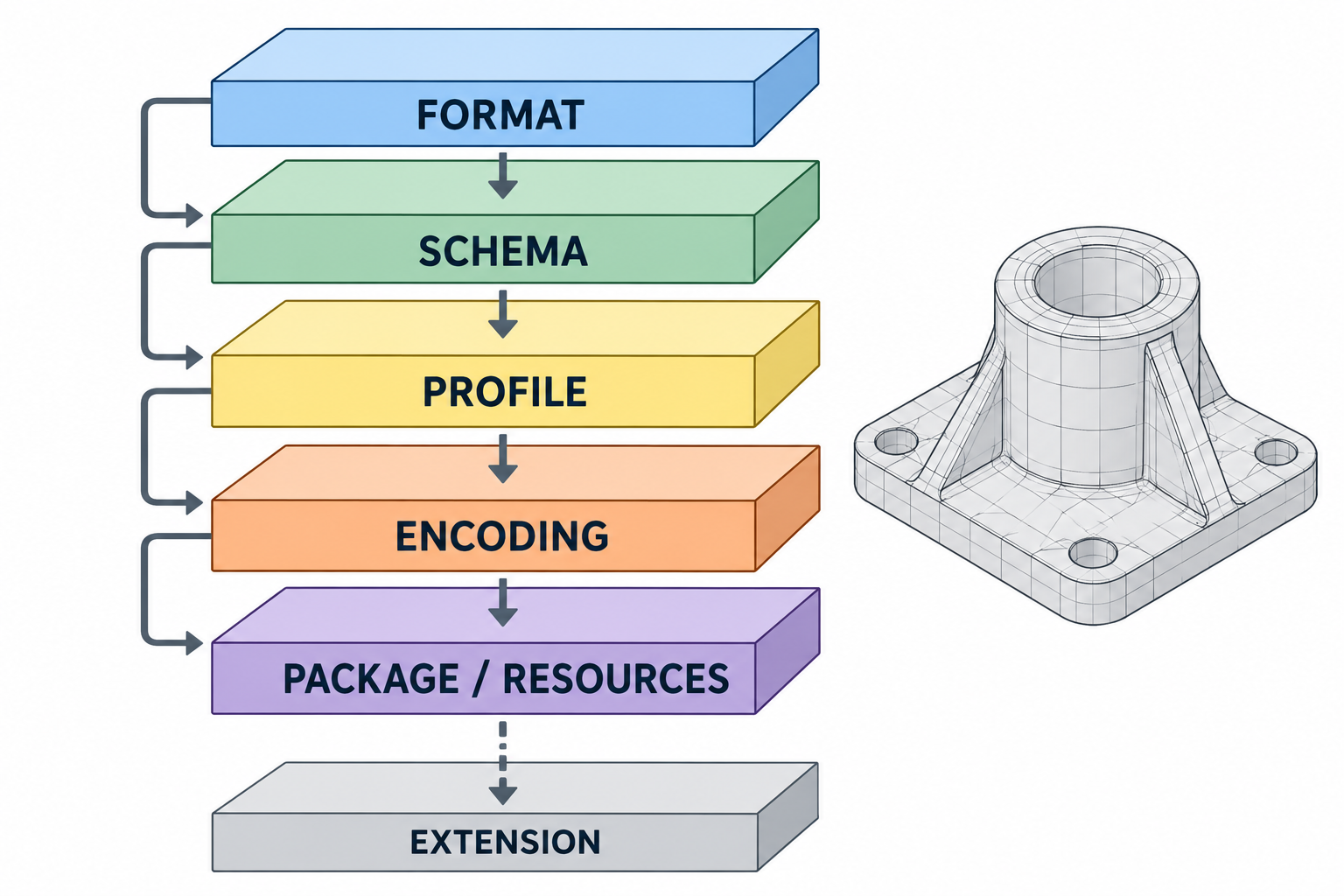
The label is a routing hint
A filename extension helps software choose how to inspect a file. It usually does not tell you all of the following:
- which information model or representation family is inside;
- which schema release, application scope, profile, or model view applies;
- which optional extensions are used or required;
- whether the bytes are text, binary, or a container holding several parts;
- where external resources are located; or
- whether a particular product can read, write, translate, or use the result.
Those details are separate layers of the exchange contract. A receiver can recognize an extension and still lack the implementation or context needed to interpret the content usefully.
A practical vocabulary
The terms overlap in everyday conversation, so use them as questions about different layers:
| Term | What it identifies | Question to ask |
|---|---|---|
| Representation family | The broad kind of data being delivered, such as native authoring data, neutral product data, a scene asset, or a print-oriented model | What kind of information is this meant to carry? |
| Format | The defined organization and syntax for a representation | What rules describe the file or document? |
| Schema | The entities, properties, relationships, and constraints available in a model | Which data structures can appear? |
| Application protocol or application scope | A scoped selection of model concepts for a domain or use | Which part of a larger model is intended for this exchange? |
| Profile or model view | A constrained view of what a consumer is expected to provide or understand | Which subset or information requirement is in play? |
| Extension | An additional, named capability beyond a core representation | Which extra behavior or data is declared, and is it required? |
| Encoding | How the representation is serialized, such as JSON text or binary data | How are the model’s values represented as bytes? |
| Container or package | A physical wrapper that stores one or more related parts | Which files, relationships, and resources are inside this document? |
| File extension | A short suffix used for naming and routing | What should I inspect next? |
Not every representation uses every term. The point is to avoid treating one label as if it answered all of them.
Bounded examples
ISO describes ISO 10303 as a series with architectural parts that include data-specification methods, application protocols, implementation methods, conformance testing, and identification of schemas and other information objects. That overview explains why “STEP” is a family with scope choices, not a single promise about every product exchange. The public ISO page describes the 2024 edition’s architecture and lifecycle; it does not prove a product’s implementation or a route’s preservation result.
The implementation method is another identifier to record. ISO 10303-21:2016 specifies clear-text encoding of an exchange structure; ISO 10303-28:2007 specifies XML representations of data defined by EXPRESS schemas; and ISO/TS 10303-25:2005 describes an EXPRESS-to-UML mapping that produces XMI-conforming files. These are distinct physical or binding methods, not substitutes for naming the application protocol or schema. In particular, the Part 25 XMI binding should not be mistaken for the usual STEP product-data exchange form. Their existence does not establish which method a particular application reads or writes.
IFC gives a different, visible versioning example. buildingSMART lists IFC 4.3.2.0 as an official release, while IFC 4.4 and IFC 5 are shown as under development on the accessed release database. Its notation is Major.Minor.Addendum.Corrigendum, and the page assigns different compatibility implications to those components. A file named .ifc still needs its exact release and any applicable view or information requirement before a support claim becomes meaningful.
glTF shows why even two version labels can refer to different layers. A valid glTF asset declares asset.version; a Binary glTF (GLB) also has a container-header version. The specification says the GLB header version refers to the container and does not replace checking the asset version in the JSON chunk. A .glb suffix therefore identifies a container form, not the complete interpretation or destination behavior.
FBX shows that one suffix can also hide an encoding choice: Autodesk’s older SDK documentation describes binary and ASCII forms under the same .fbx extension. The 3ds Max 2026 exporter documents choices for FBX file type, version, units and scale, axis conversion, and media embedding. These are release-specific exporter settings, not evidence of a particular output or receiver interpretation.
PCB fabrication data uses several representation roles
A 3D board or enclosure model used to coordinate physical fit is not the same deliverable as PCB fabrication data. Gerber Revision 2026.05 defines two-dimensional layer images and attributes such as .N net names and .P component-pin identifiers. The Gerber Job File is separate JSON metadata for items such as stackup, design rules, and file attributes. Drill/rout data may be a separate output, such as XNC or Gerber. These roles are not interchangeable, and the specifications do not establish what a particular exporter includes. See PCB fabrication representation choices for a scoped request checklist.
Record the exchange contract
Before sending or evaluating a file, request a record like this:
representation_family: "..."
format_or_standard: "..."
format_release: "..."
schema_application_scope: "..."
profile_or_model_view: "..."
extensions_used: []
extensions_required: []
encoding_and_container: "..."
units_axes_scale: "..."
exporter_settings: []
external_resources: "none | listed separately | embedded and external"
direction: "read/import | write/export | direct open | reference"
source_product_and_release: "..."
destination_product_and_release: "..."
downstream_purpose: "..."
Use unknown when a field has not been established. An unknown field is a reason to investigate, not a reason to guess.
What to do next
Use scoped representations when a family label is known but the schema, profile, model view, or extension scope is not. Use directional and versioned support to interpret a product’s documentation, then use translation mechanics to understand why support does not by itself establish preservation.
Key points
- A file extension is a routing hint, not a compatibility verdict.
- Format, schema, scope, extension, encoding, container, and dependencies answer different questions.
- A standard can define a representation without proving product support or downstream usefulness.
- Record the exact scope and direction before comparing a source with a destination.