An imported model is editable only for the purpose and conditions that have been demonstrated. Build a small acceptance test around the required change, retain the route context, and test updates only when the workflow promises or needs them.
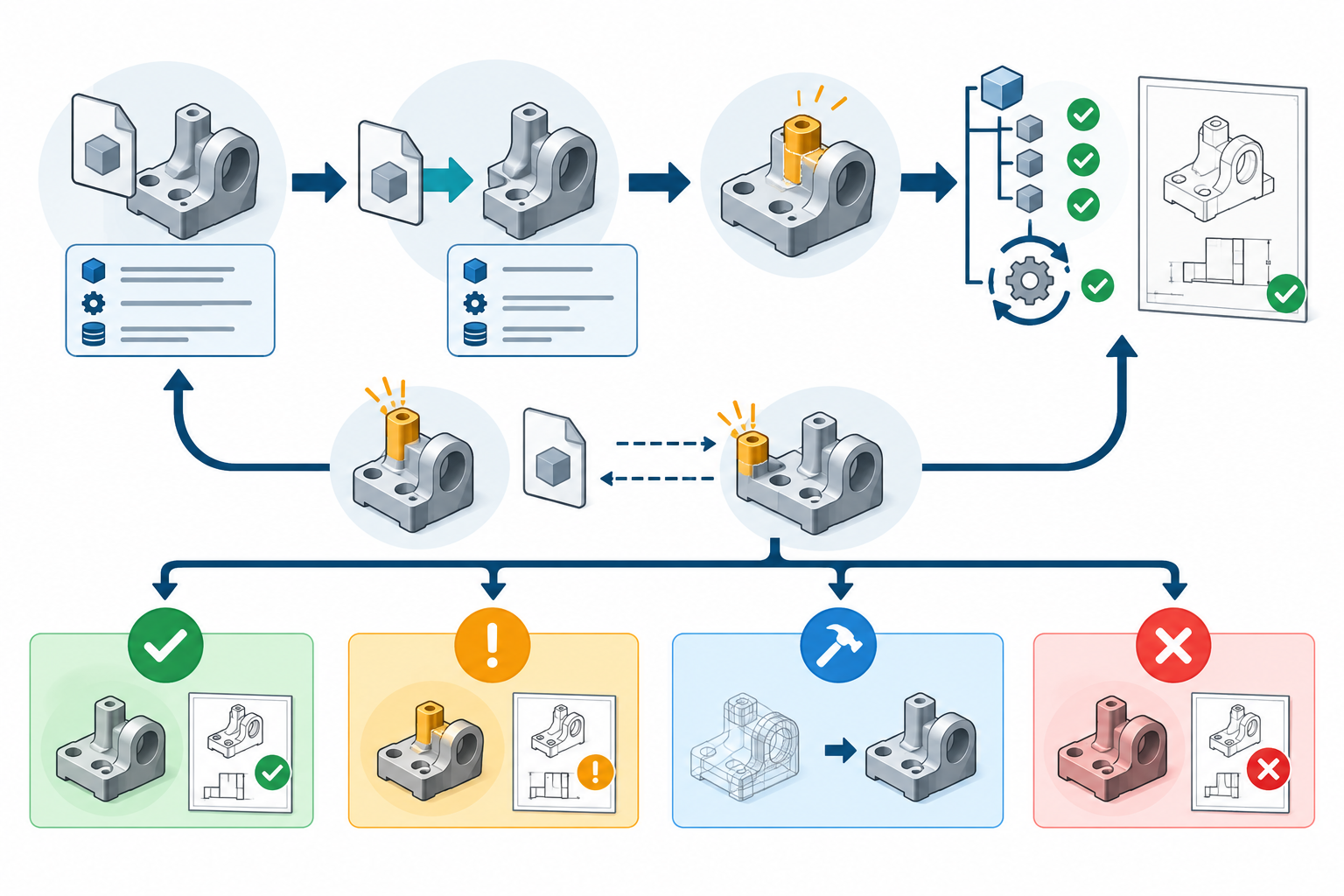
1. State the acceptance target
Write the test as an observable result:
- Change: which dimension, feature, face, sketch, constraint, configuration, or reference must change?
- Authority: which system and team is allowed to make that change?
- Output: what part, assembly, drawing, toolpath input, or other downstream result must be produced?
- Permitted recovery: are direct edits acceptable, must a feature be recognized, or is a destination-native rebuild allowed?
- Required continuity: is this a one-time delivery, a linked reference, or a recurring update workflow?
- Acceptance scope: which geometry, topology, structure, annotations, materials, units, or other layers must remain usable?
Example: “In the receiving release, increase the diameter of the four mounting holes, preserve their pattern and assembly placement, regenerate the supplier drawing, and record whether source updates remain supported.” This is testable. “The file must be fully editable” is not.
2. Record the route before testing
Save enough context that another person can reproduce the import:
| Route field | Record |
|---|---|
| Source and destination | Application, product family, release, and operating context |
| Direction and mechanism | Native handoff, reference/link, conversion, recognition, or rebuild |
| File and profile | Exact extension, schema/profile, translator version, and import profile |
| Options | Representation, object filters, units, part/assembly mode, layers, and dependencies |
| Input state | Model revision, configurations, external references, and known geometry health |
| Reports | Import/translation log, warnings, unresolved links, and repair actions |
| Test asset | The received file, test copy, changed file, and expected output |
Creo’s import documentation explicitly exposes format-specific profiles, data types, representations, and short or long logs. The documented representations distinguish full geometric and non-geometric data, display data, and structure/metadata; they do not by themselves prove feature-history or design-intent preservation. Recording these selections makes a result more meaningful than “it opened.”
Autodesk’s 2026 Inventor import guidance likewise distinguishes Reference Model from Convert Model, lists object filters and length units, and warns that mesh data is for visualization only. A support row, filter, or successful import is route context—not a change-test result.
For a Creo Parametric 13 route, also retain the selected import profile, data type, representation, configuration, and short or long log. During redefinition, record whether the source was reloaded or replaced, whether original and new geometry were compared, and how reference entities were matched. These controls make the test reproducible; they do not supply a universal pass threshold.
SOLIDWORKS 2026 exposes similar route inputs: 3D Interconnect link granularity and break-link behavior, Import Diagnostics and entity repair, imported units, and custom curve tolerance for small entities. Record the selected settings and warnings because they can affect the imported result. A control being available does not establish that the target model passed the required edit.
3. Establish a baseline
Before changing anything, compare the received result with the source or agreed reference for the layers in scope:
- key dimensions, interfaces, coordinate system, and units;
- solid/surface health and topology needed by the change;
- assembly placement, component identity, configurations, and external references;
- sketches, constraints, parameters, recognized features, and feature-tree state when required;
- PMI, drawing views, material or metadata fields, and downstream prerequisites.
Keep the baseline separate from the edited result. If the imported model is already defective, an edit test may hide the real failure. Route geometric or structural defects to the corresponding layer-specific checks rather than treating editability as a proxy for all interoperability.
4. Perform a representative change test
Choose a change that exercises the reason for the exchange, not a convenient face move. Change the smallest meaningful unit and inspect:
- the intended dimension or feature;
- dependent geometry and rebuild status;
- constraints, parameters, sketches, configurations, or patterns required by the task;
- assembly placement and external references;
- annotations, metadata, and downstream output in scope;
- warnings, failures, manual repairs, and any geometry that changed unexpectedly.
A direct face move may prove that one geometric operation is available. It does not prove that a constrained sketch can be edited, that a feature pattern remains controlled, or that later source changes will preserve the edit. A recognized feature may expose editable parameters while still differing from the original feature order or dependencies.
Use geometry and comparison tools only for the layer they actually inspect. Fusion’s Validate checks selected imported geometry and can attempt repairs in Direct Modeling Mode; its tolerance and Basic/Standard checking levels are geometry-health controls, not editability acceptance. SOLIDWORKS Compare Features requires parameterized solid features, uses feature names for pairing, and excludes listed feature classes. Compare Geometry treats each solid as one entity and does not compare feature parameters; both comparisons require suitable origin alignment. A comparison result therefore supports a scoped check, not proof that source intent or every required edit survived.
5. Test updates only when they matter
For a static converted delivery, an update test may be out of scope; record that the result is intentionally independent. For a linked workflow, make a controlled source change, reload or update the destination, and check:
- whether the source change arrived;
- whether the intended destination work survived;
- whether downstream references, features, structure, and outputs still resolve;
- whether new or orphaned surfaces, missing links, or reference-pair warnings appeared;
- what the fallback is if the update cannot be accepted.
The route must define the update authority. Autodesk documents an Update action for supported Inventor associations and also documents orphaned surfaces when source and destination objects no longer match. It specifically warns that updating a referenced STEP file is a new translation that can create unresolved geometry or prevent Inventor changes from updating correctly.
An ATB-enabled Creo import has a different explicit boundary: the documentation says edits to the imported geometry can be lost on an ATB update unless the import is made independent before editing. SOLIDWORKS 2026 describes update and break-link behavior for 3D Interconnect, but its format/version table does not establish the result for a particular model or required change. These examples show why an update claim needs its own test.
Onshape adds an important scope check: an imported-part update changes the target Part Studio and reapplies target features where possible, but those features may enter an error state. The Assembly is not updated by that workflow and remains at its original import state. If the deliverable includes an Assembly or instances, test them separately rather than treating a successful Part Studio update as complete route acceptance.
Onshape’s View in Repair workflow provides a bounded way to investigate broken references in a Part Studio. It can show a selected healthy history point alongside the current state; start with the first broken reference and then review dependent features downstream. The repair operation handles one reference at a time, and some reference types are unsupported. A healthy feature list shows that references regenerated, not that the replacement preserves engineering meaning. Verify the geometry and rerun the required change test.
If the required continuity is a Rhino 8 modeling-history chain, test that mechanism separately from a CAD feature tree. History recording is off by default, and only supported commands create a parent-to-result connection. Enable recording before running the command, confirm the output is linked to its inputs, check that History updating is on, change an input, and verify that the expected result updates. Directly editing a child can break that connection; heed the break warning and undo the edit if the parent relationship must remain. A working Rhino history chain demonstrates Rhino-native command dependency, not that imported CAD carried its source history or design intent.
6. Choose an exit result
| Result | Use when |
|---|---|
| Pass for stated scope | The representative change and all required layer and downstream checks succeeded, with route context retained. |
| Conditional acceptance | The required use works with named limitations, manual steps, fixed release/profile, or an explicitly independent result. Record the conditions and owner. |
| Rebuild decision | The shape is usable but the required control, repeatability, or dependencies are not. Preserve the received model and approve selective or full reconstruction. |
| Reject or escalate | The required change, output, or dependency behavior cannot be demonstrated, or the result is unsafe to use for its purpose. |
There is no universal pass threshold for “editability.” ISO 10303-108 distinguishes parameter and constraint representation from procedural history and post-transfer editing behavior, while product documentation describes bounded operations in named releases. A passing sample therefore increases confidence for the stated route and task; it does not establish universal feature-history preservation or future-version behavior.
Preserve the evidence
Keep the source and received files, import settings, logs, baseline measurements, changed test asset, update result if applicable, and final decision together. Record what was actually tested and what was not. If a future change differs materially in model, release, profile, direction, or downstream purpose, rerun the relevant test rather than reusing an unqualified “editable” label.
For a scan or mesh, add the chosen body representation and the geometric comparison used for the required interfaces; the scan/mesh guide outlines the available decision paths. For IFC, keep reference use separate from receiver-native conversion, and test source reload and dependent host work when updates matter; see IFC editability in BIM.
When recognition is part of the route, preserve the intermediate stage and resulting feature identities as well. SOLIDWORKS documents that staged recognition can rename features and limit some commands to the features currently shown in the intermediate stage. Those identity and stage changes may affect downstream references even when the geometry appears unchanged, so test the references explicitly.
Key points
- Test the required change, not merely opening, viewing, measuring, or moving one face.
- Record release, direction, profile, representation, filters, units, dependencies, and logs.
- Treat linked update behavior as a separate acceptance dimension from destination-side editing.
- A bounded pass is useful evidence; it is not a universal compatibility guarantee.