A board’s visible component bodies and copper shapes do not necessarily carry the electrical relationships needed to edit, verify, or manufacture it. Specify which objects must remain identifiable and which relationships the receiving task depends on.
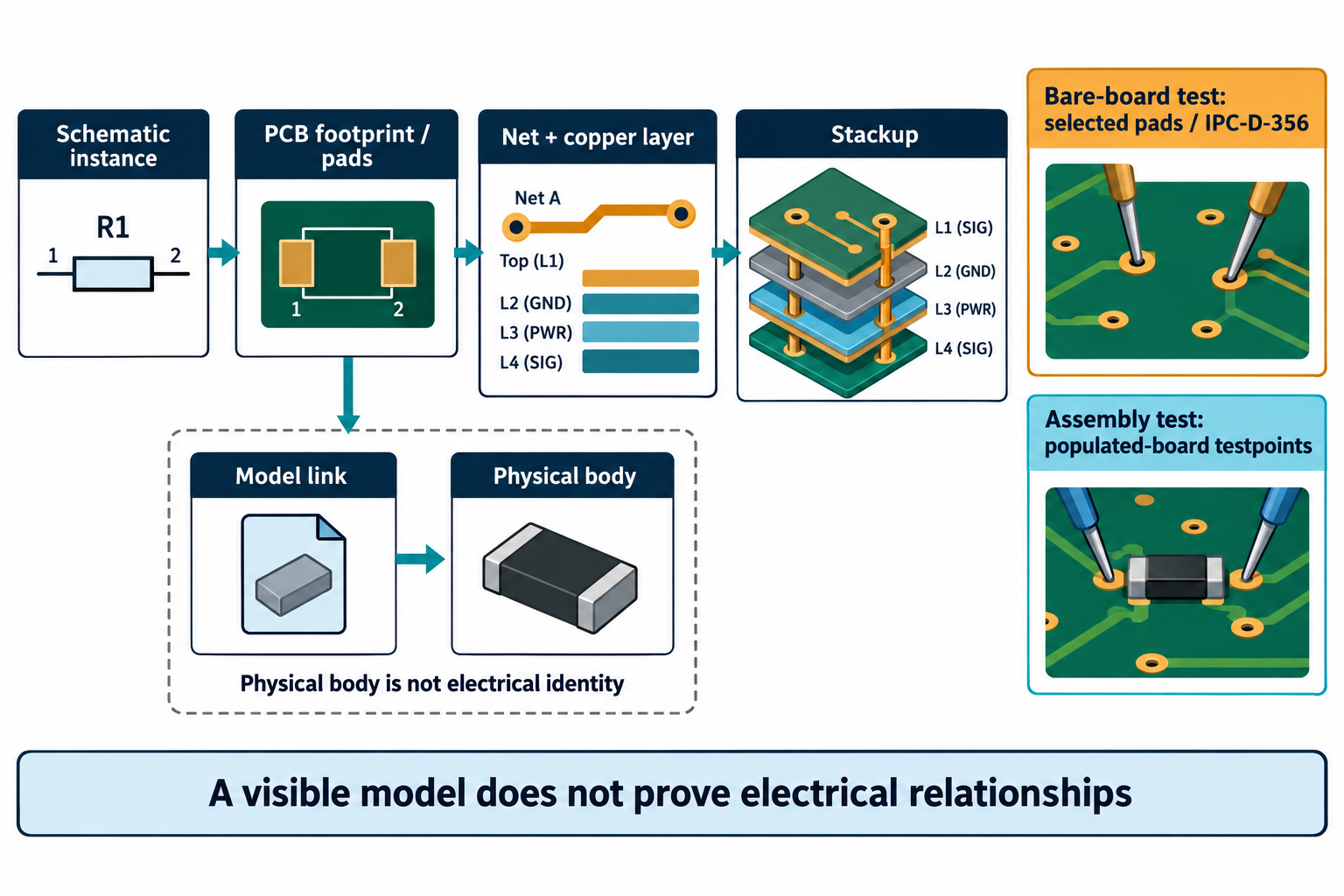
Ask three different identity questions
- Which physical part is this? A model may match a component body by reference designator or another property, or it may be an unlinked shape.
- Which design instance is this? A repeated component or board occurrence may need an instance-specific association, not only a reusable part description.
- Which electrical relationships must be available? Pins or pads, nets, constraints, layers, stackup, and population can be separate from the physical model.
In Altium’s documented CoDesigner flow, a model can become a native ECAD component only when the native-link configuration and matching component are present. Without that mapping, the model can remain a free body. The product documentation also describes using component links between schematic and PCB objects. These are Altium-specific conditions; a reference designator or matching shape is not a cross-system identity guarantee.
The associations can be sketched as follows; an exchange may carry only some of these links, and product mapping rules differ:
Schematic component instance ── association ──> PCB footprint and pads
                                                    ├── pad ──> net and copper layer
                                                    └── model link ──> physical body
Do not treat every netlist as the same deliverable
The word “netlist” can refer to different information and tasks. KiCad documents a schematic netlist for external packages, while its PCB editor describes IPC-D-356 as a board netlist suitable for bare-board manufacturing checks. The schematic editor’s forward annotation updates PCB connectivity within KiCad; that internal operation is not proof of cross-tool interchange.
Before sending connectivity data, state whether the recipient needs schematic relationships, a board-level manufacturing test reference, a CAM comparison aid, or some other defined view. Identify the file and options that produce it. For example, KiCad’s IPC-D-356 exporter can omit unconnected pads when that option is selected. Whether those pads belong in a recipient’s test data depends on the agreed test task.
Test data also depends on the stage. Altium documents separate fabrication testpoint assignments and reports for bare-board tests and assembly testpoint assignments and reports for a populated board. Its CAM Editor describes IPC-D-356 as a reference for selected net reconstruction and comparison tasks, not as a complete electrical-equivalence check. Confirm the test stage, source settings, pad coverage, and recipient interpretation before relying on the file.
Preserve layer and population meaning
For each intended use, specify the required copper and fabrication layers, layer names or ordering, units, stackup information, and selected population. A format may be able to represent an electrical net or stackup without a particular exporter writing it or a receiver interpreting it as intended.
KiCad 10.0.7 release notes list specific Altium-import changes for physical stackup, connected copper nets, selected rules and netclass defaults, net naming, and unresolved-rule diagnostics. That is bounded import behavior in that release. It does not establish complete property equivalence, correct electrical behavior, or preservation for every Altium design.
| Information | Ask before transfer | Check after transfer |
|---|---|---|
| Component identity | Which identifier or property links the source part to the destination object? | Resolve unmatched, substituted, or repeated components |
| Pin, pad, and net relationships | Which net view is required and for what task? | Compare required associations and investigate unconnected or renamed items |
| Stackup and layers | Which layer sequence and design or supplier properties matter? | Compare the received stackup and layer identities with the source brief |
| Population | Which variant or fitted/unfitted state is authoritative? | Reconcile component list, BOM, placement, and any model against that state |
No visual model, generic “netlist,” schema pass, or import status alone proves electrical correctness. Keep any unknown mapping or constraint explicit, then use a task-specific verification process. For manufacturing deliverables, see the PCB package guide; for shape and component association, see the enclosure-fit guide.