A bare-board fabricator and an assembly supplier may need different data. Start by naming the recipient and the task, then agree on the board state, selected population, and required deliverables. There is no evidence here for one universal PCB supplier package.
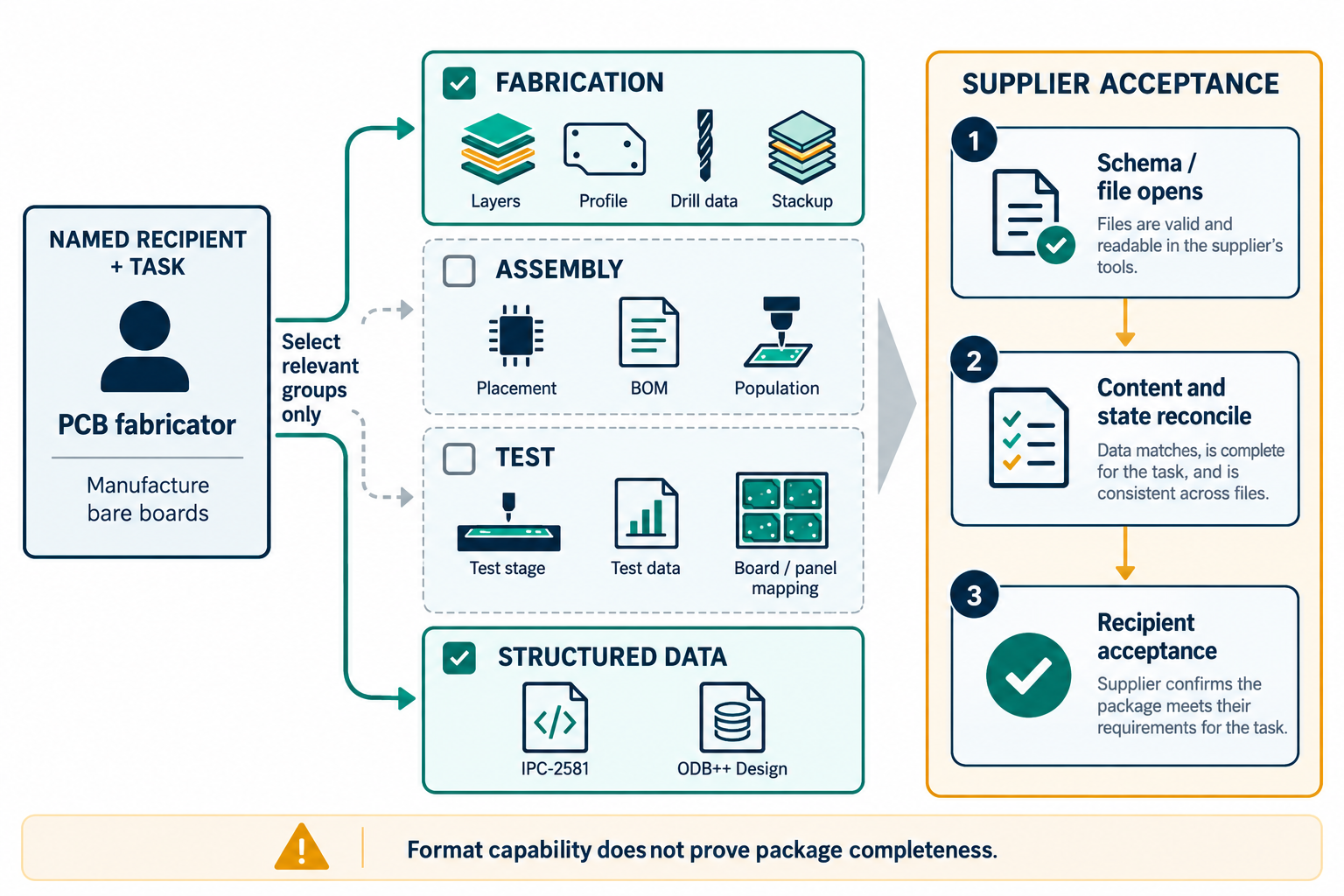
Separate fabrication, assembly, and design context
| Purpose | Examples of information to discuss | Questions for the recipient |
|---|---|---|
| Bare-board fabrication | Copper and other layer images, machine-readable board profile, drill and rout data, layer sequence, materials, finish, and board thickness | Which file functions, layer names, dimensions, drill details, and stackup fields does the fabricator require? |
| Component assembly | Top and bottom component locations, orientation, reference designators, part identifiers, population, and bill of materials | Which placement, BOM, variant, polarity, and component fields are needed for this build? |
| Bare-board or assembly test | Connectivity or testpoint information whose scope matches the test stage | Is the test for a bare board or a populated assembly, and which test data does the provider use? |
| Structured manufacturing description | A configured IPC-2581 or ODB++Design output, where supported and requested | Which standard revision, output mode, fields, and receiver version are supported by both sides? |
Confirm this list with the named recipient; it is not an instruction to send every possible file. Keep the board revision, output settings, variant, and generated data set together so each file can be reconciled with the same intended state.
Test outputs need their own stage and association checks. Altium documents separate fabrication and assembly testpoint assignments and reports; in a panel with multiple embedded board arrays, its documented report can produce multiple IPC-D-356A files without specifying a universal filename-to-array mapping. In the same Altium documentation, report setup is stored in the project when generated directly from a PCB and in the Output Job when configured there. KiCad’s IPC-D-356 export can omit unconnected pads when that option is selected. Record the test stage, controlling settings file, panel instance, and recipient mapping, then inspect the emitted files against the agreed test plan.
Treat file families as complementary
Gerber fabrication data is a set of machine-readable layer files. Ucamco’s current specification defines alignment and file attributes for a fabrication data set. Its Gerber Job format carries additional fabrication documentation, and Ucamco permits partial implementations. A drawing or job file therefore does not replace machine-readable layers, and the existence of a Job file does not mean every relevant field is present.
Assembly information can be separate again. Gerber X3 defines component layers that can carry component location, orientation, identification, and pin information. If a data set omits inner copper for an assembly purpose, it does not implicitly include the netlist; ask for connectivity data separately when the task requires it.
Structured formats can represent several data classes without proving that a particular exporter populates them. The ODB++Design specification describes BOM, variant, stackup, and electrical structures. KiCad and Altium documentation expose exporter controls for revisions, units, precision, fields, or variants. Check the actual build and generated output rather than treating format capability as exporter behavior.
Siemens’ ODB++Design FAQ describes optional content segmentation, including neutralizing net names or withholding component layers when the source tool supports those controls. Treat this as a recipient-specific release choice, not a privacy guarantee or evidence that the remaining package is complete for the supplier’s task. Verify the actual exporter controls and emitted package with the recipient.
IPC-2581 revision documentation can conflict. IPC’s announcement describes Revision C; KiCad 10 documentation exposes B and C; Altium’s fabrication page, updated July 9, 2026, lists A or B for its exporter. Do not resolve that conflict from a standards announcement or a file extension. Verify the installed exporter controls and the recipient’s accepted revision.
Use validation as one layer of acceptance
The IPC-2581 Consortium says its validation tool checks schema conformity for the selected revision. It does not establish design correctness, completeness, or manufacturability. Add the checks appropriate to the task:
- Verify the source revision, board, and population used for the release.
- Reconcile layer images, profile, drill/rout, stackup, placement, BOM, and test data as applicable.
- Inspect export settings, warnings, omissions, and any separately generated files.
- Confirm the receiving software can open and interpret the chosen representation.
- Obtain the recipient’s acceptance against its own requirements.
A schema pass is not a receiving or manufacturing result. For panel source and child-board stackup state, see Hand Off a Panelized PCB Without Losing Board-Level Context. For electrical identity and test-netlist scope, see Preserve Electrical Identity, Connectivity and Stackup Context.