A PCB model can look complete while omitting a component, showing the wrong population, or using a different origin from the enclosure. Define the fit question first: which board state and components must the mechanical recipient compare, and which features determine acceptance?
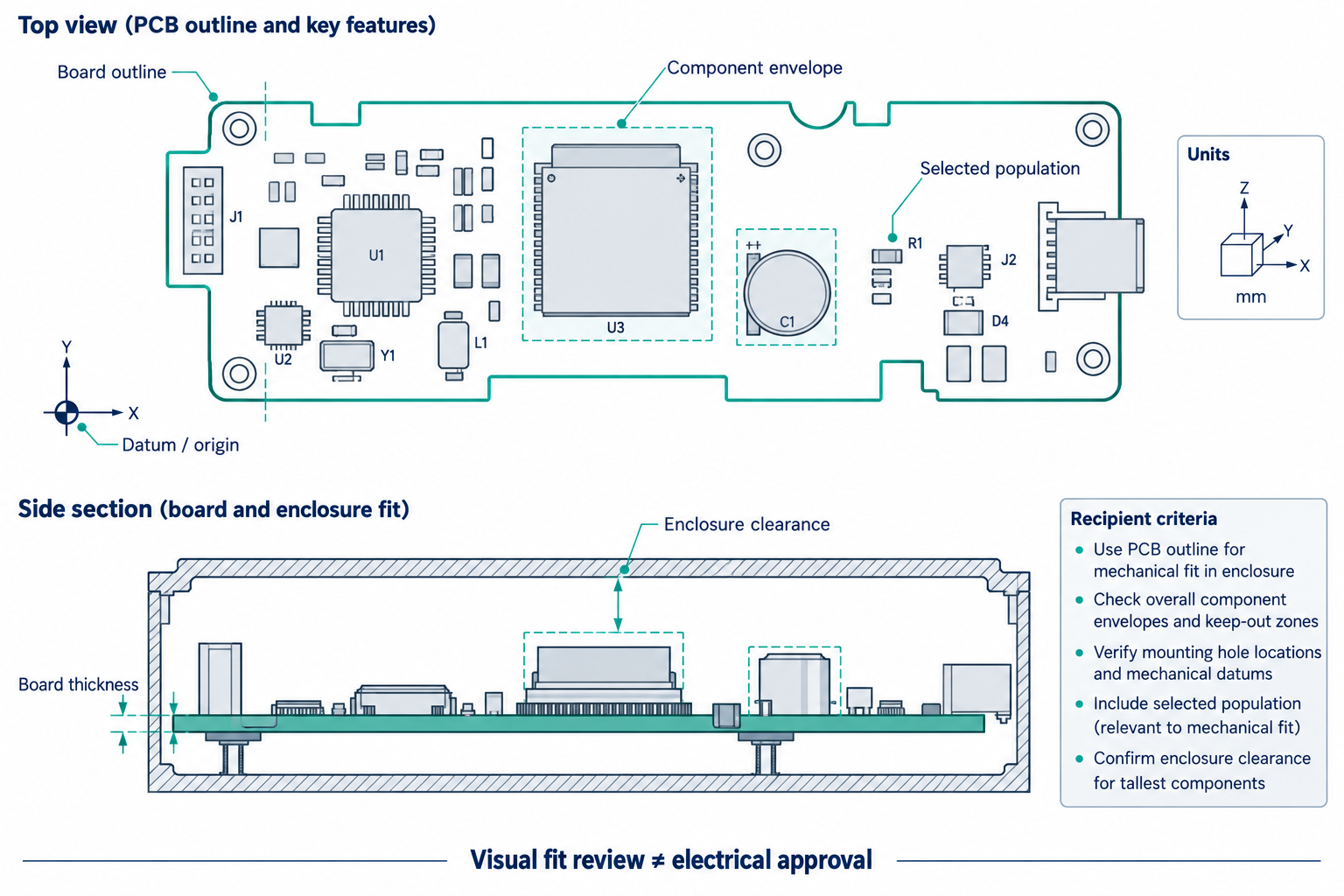
Specify the model and its reference frame
The handoff brief should identify:
- The released board revision and selected variant or population.
- The board outline, cutouts, thickness, mounting holes, and any other fit-critical features.
- The coordinate origin, units, board side, orientation, and the reference frame used by the enclosure.
- Component models that affect clearance, their intended reference designators or identifiers, and any model substitutions.
- Which items are intentionally absent, simplified, or represented only for visualization.
- The recipient’s clearance, alignment, or dimensional criteria. Do not invent a generic tolerance for every enclosure.
Keep the geometry questions separate. Compare the board outline and mounting locations against the source; then compare component positions and envelopes against the selected population. A visual match is useful for review, but it is not electrical, thermal, or manufacturing approval.
Keep a physical body distinct from an electrical component
A 3D body communicates shape. It does not by itself establish the associated schematic component, pin mapping, net, or electrical function. In Altium’s documented CoDesigner flow, an MCAD model can return as a native ECAD component only when the required mapping and component are available; otherwise it can remain a free body. The reference-designator and configured-property matching rules are specific to that workflow. They are not universal identifiers.
Similarly, a component model missing from an export is not necessarily an absent electrical component. Record separately whether the component is present in the design, whether its physical model was included, and whether the recipient can associate the model with the intended component.
Check population and output selection
The mechanical model must represent the population needed for the fit decision. KiCad documents that the selected variant can affect 3D model export and placement output. Autodesk Fusion documents a more specific boundary: its schematic and 2D PCB can switch assembly variants, while 3D PCB documents and drawings show only the Base variant. That describes Fusion’s document behavior, not what another exporter or receiver will do.
For an assembly variant, compare the reference designators and fitted/unfitted states in the model against the source’s intended population. If the model does not expose a reliable component identity, use a separate placement or component list and reconcile it with the selected variant. Do not infer a matching population from the rendered shape alone.
A practical receipt check
| Check | Evidence to retain |
|---|---|
| Board identity and source state | Project or release identifier, board name, revision, and selected variant |
| Geometry | Received outline, cutouts, thickness, holes, units, and datum compared with the agreed source |
| Component population | Expected reference designators compared with the received physical models or placement list |
| Model correspondence | Missing, substituted, or free-body models recorded against the intended components |
| Fit | The named enclosure, clearance criteria, and review method used for the decision |
| Limitations | Any unavailable electrical relationships, hidden geometry, or unverified receiver behavior |
A successful import says that the receiver opened something. It does not prove dimensional equivalence, component identity, or enclosure fit. If the task also requires electrical meaning, continue with electrical identity and connectivity; for device-level placement, see multi-board exchange.