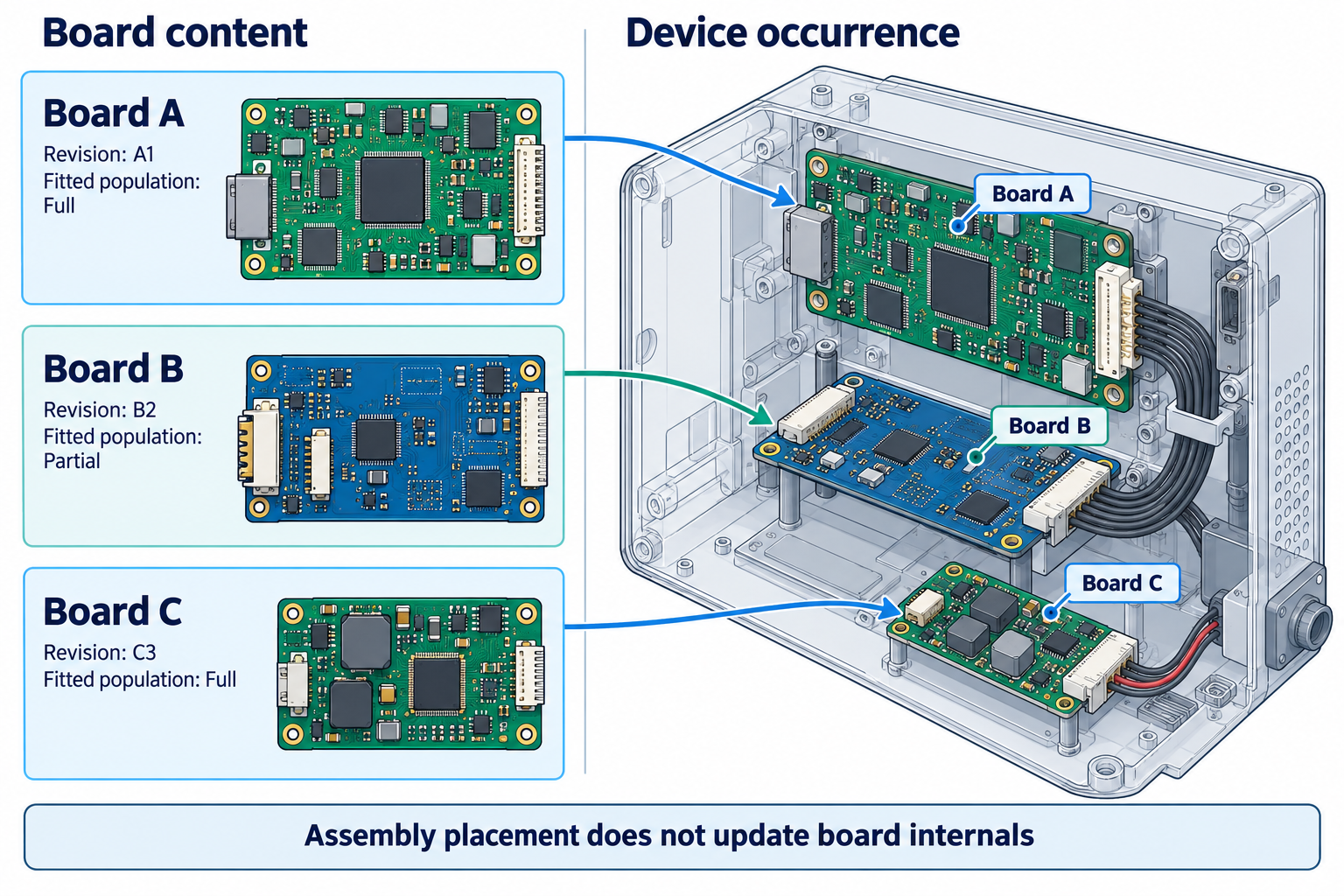
A correctly placed device assembly does not prove that each PCB contains its intended design revision, population, or electrical interface. Keep board content and device-level placement as separate states in the exchange brief and in the receiving checks.
A fabrication panel containing repeated or mixed child boards is a different state from a product assembly containing board occurrences. Use the panel handoff guide for that manufacturing arrangement.
Track each board and each occurrence
For every board, identify its source project, released state, and selected population. Separately identify where that board occurs in the device: occurrence count, orientation, placement, and relationship to the enclosure. If two occurrences use the same board design, confirm whether the receiving workflow represents both occurrences as intended; do not assume an assembly view makes that association clear.
Also distinguish connector mating geometry from electrical pin correspondence. A visible connector or board edge can help review mechanical fit, but it does not prove that the intended pins, nets, or configuration match.
Board synchronization and assembly synchronization solve different problems
Altium’s documented CoDesigner multi-board workflow transfers each PCB individually, then links the boards into a device assembly. Its documentation says board-level synchronization must be maintained independently of synchronization of the assembly containing those boards. In the described assembly push back to ECAD, CoDesigner sends each PCB’s location and orientation plus objects identified as part of the enclosure. A change to an individual board must be pushed through that board’s own path.
Use this as a bounded product example, not a universal multi-board exchange contract. Confirm the exact product, connector, release, license, and feature conditions in the installed system. The documentation’s feature list does not prove that a particular installation transferred the expected boards or that the recipient applied an update.
Reconcile the two levels at receipt
| Level | Record | Verify |
|---|---|---|
| Board | Board identity, revision or release, variant, and source owner | The received board content matches the named source state |
| Device assembly | Board occurrence, count, orientation, position, enclosure objects | Every intended occurrence is present and positioned in the expected context |
| Electrical interface | Connector identity, pin or pad mapping, nets, and applicable configuration | The relevant electrical associations are available and checked separately |
| Change state | Source-side board update, device-level update, received changes, and save state | No assembly update is mistaken for an update to board internals |
If a mechanical model or device assembly is the only delivered object, list which board-level details remain unavailable. If a source-state mismatch appears, stop treating the placement as current and reconcile each board through its authoritative design path. Do not infer atomic updates, complete repeated-occurrence support, variant coverage, or connector pin mapping unless the chosen workflow documents and demonstrates those properties.
For single-board geometry, see Hand Off a PCB Model for Enclosure Fit. For change acceptance and source saves, see Control ECAD-MCAD Changes.