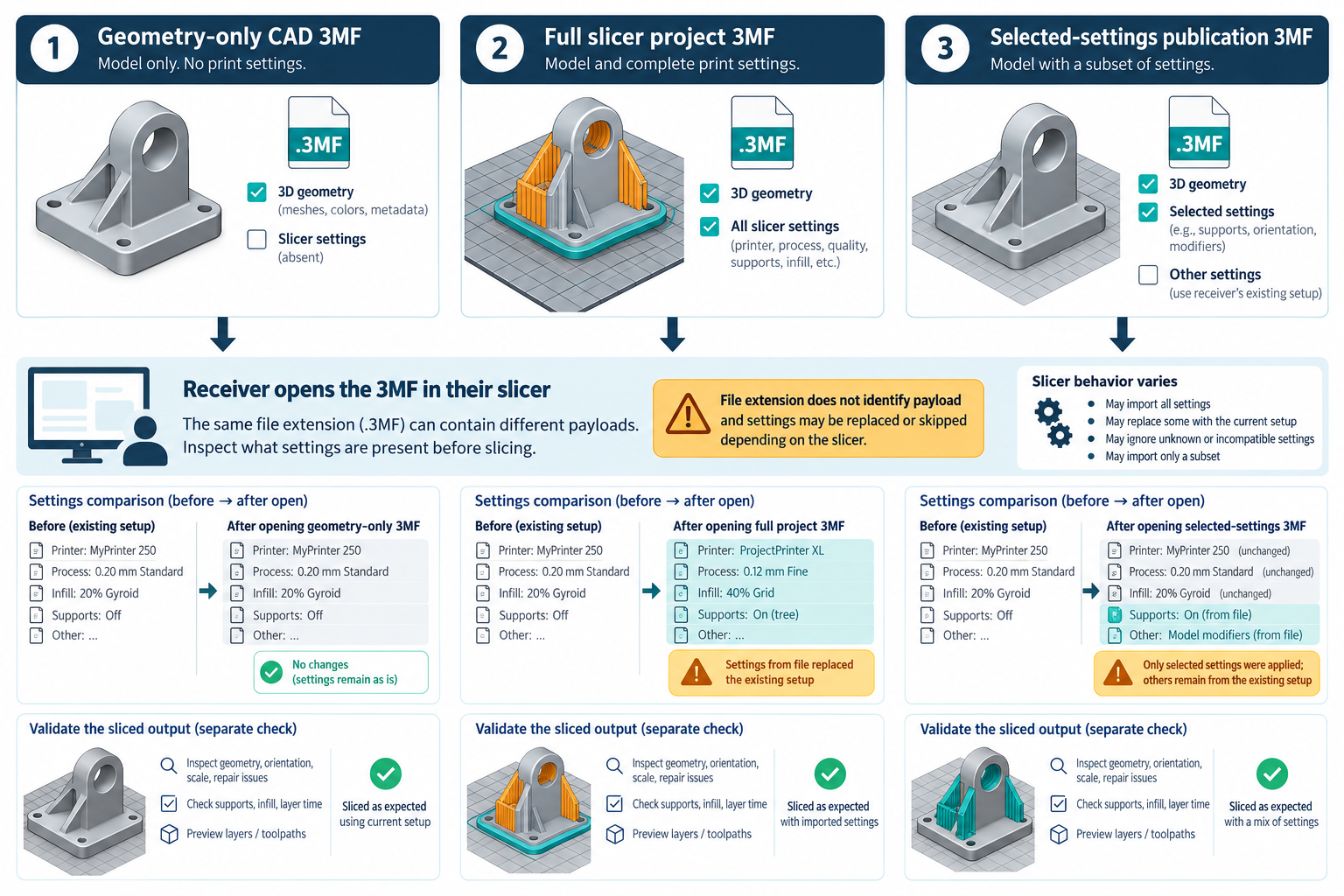
The .3mf extension does not tell a fabrication recipient whether a file contains geometry only, a complete slicer project, or a selected settings package. Identify the intended content and opening operation before interpreting what changed in the slicer. No cited source establishes cross-slicer settings portability or an accepted print result.
Identify what the sender is publishing
For example, SOLIDWORKS Design 2026 can save part and assembly documents as 3MF. Its documented export options can include base materials, surface-mapped textural appearances, and slice information when Generate slices is selected in Print3D. Those are sender-side controls; they do not establish retained assembly hierarchy or what a specific slicer, printer, or process will do with the data.
Write the handoff as one of these intents:
- Model geometry: recipient places and orients the model and selects the machine and process settings.
- Slicer project: recipient reopens a model plus a project/settings snapshot in a compatible slicer context.
- Selected settings: recipient receives a limited settings package applied to an already selected machine/process setup.
An extension or a successful import does not prove which of these was delivered.
Separate full projects from selected-settings packages
PrusaSlicer describes its 3MF project as a snapshot of the model and settings. The PrusaSlicer 3.0.0 first-print guidance warns that opening a 3MF may load printer, filament, and print settings that replace the receiver’s current settings. Before opening, record the active printer, nozzle, filament, and print profile so the recipient can see what changed.
OrcaSlicer distinguishes Save Project from Publish 3MF. Published 3MF packages selected settings for another project; in the documented workflow those settings are applied over the existing setup without overwriting the printer setup. Selection and receiver conditions matter: an empty selection carries geometry only, mixed-filament dependencies can matter, mismatched settings may be skipped, and a single-extruder receiver takes only the first extruder’s values. Do not infer a setting-by-setting match across slicers.
Keep command-line settings precedence local to Bambu Studio
Bambu Studio’s CLI documentation describes one precedence order for its own slicing route: command-line settings, then loaded settings, then the input 3MF. The documented example also shows external machine or process settings replacing input values, while blank filament slots preserve input settings. Capture the exact input project, loaded profiles, command-line arguments, and installed build for that run. This is not a universal 3MF precedence rule, and the example is not a ready-to-print recipe.
Check model intake and generated output separately
Open the file in the named target slicer/version and inspect the actual objects, dimensions, units, orientation, placement, modifiers, materials, and settings the task requires. If the receiver transforms units, axes, or build-volume placement, verify those values in that receiver rather than relying on the sender’s preview.
Then inspect the resulting sliced/build output against the fabrication requirement. An openable model, a loaded project, or matching setting names does not establish correct geometry, printer compatibility, physical quality, or manufacturing acceptance. Process parameters and build acceptance belong to the responsible manufacturing workflow.
Use a small controlled comparison
- Record the source CAD product/release, selected model/configuration, object scope, 3MF export options, and whether the sender intends model, project, or selected settings.
- Record the receiving slicer build, active printer/nozzle/material/profile, and the exact open/import operation.
- Compare the model’s dimensions, orientation, placement, object count, modifiers, and required material/appearance data.
- Compare receiver settings before and after opening. Identify each value that was replaced, retained, skipped, or overridden.
- Generate the intended output and apply the project-specific acceptance checks. Keep geometry, settings, and build-output conclusions separate.
If the setting mapping cannot be established, send a model-only file and make the recipient responsible for selecting and validating its own profile.
Key points
- A CAD 3MF, slicer project, and selected-settings publication are different handoffs.
- Opening a project can change the receiver’s printer, filament, or process state.
- Compare both model interpretation and receiver settings after the actual open/import operation.
- A 3MF file or successful slice is not proof of cross-slicer portability or accepted fabrication.