“The destination supports this format” is a useful starting fact, not a preservation guarantee. A defensible CAD exchange claim identifies the exact direction, release context, required information, and receiving task that the evidence actually covers.
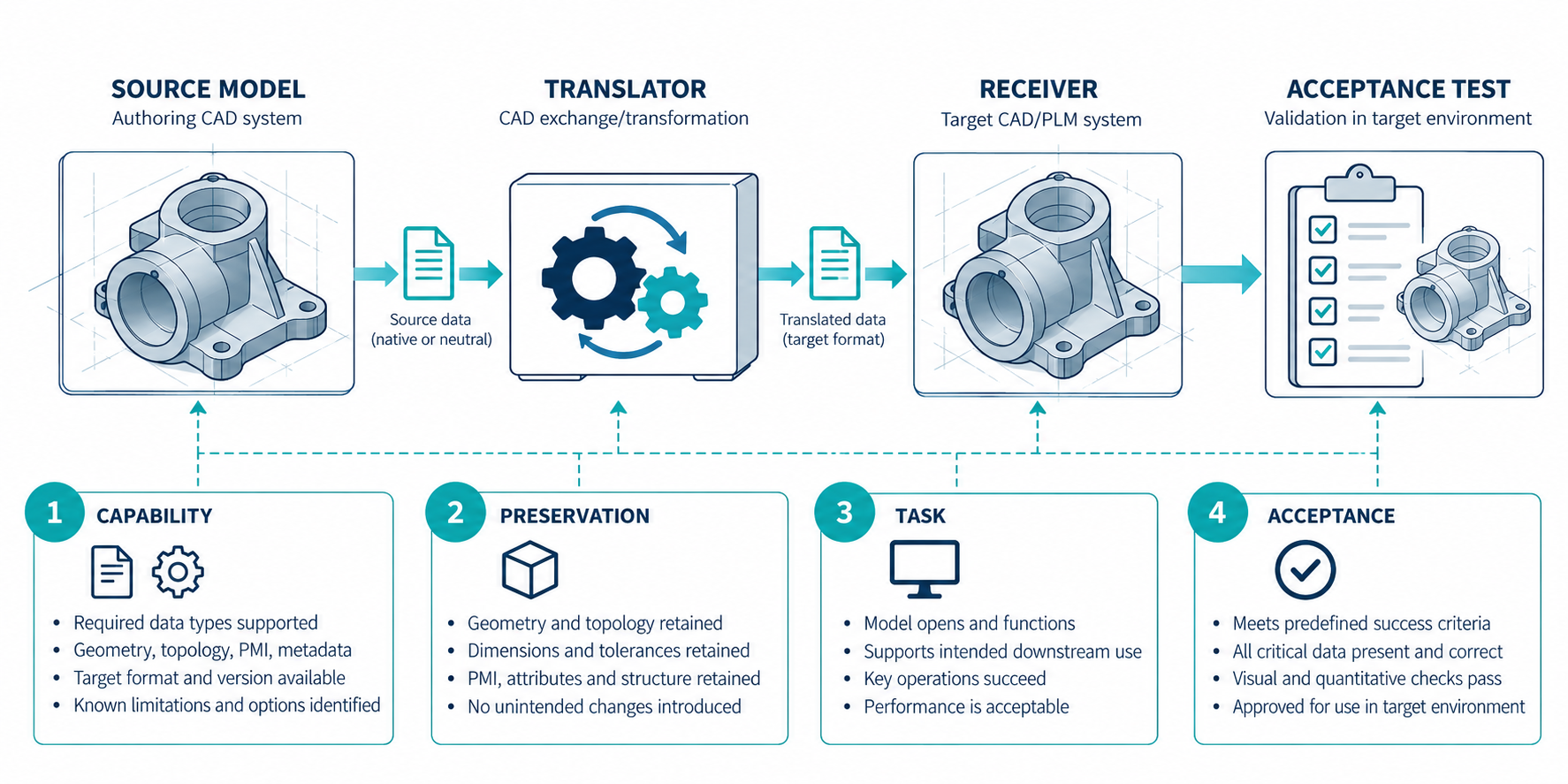
Why three common statements are too weak
These statements can describe real outcomes while still failing to answer the reader’s question:
| Statement | What it may establish | What remains open |
|---|---|---|
| “The format is supported.” | A product or document names a format in a stated context. | Direction, release range, options, information mapping, and task usefulness. |
| “The file imports.” | The destination accepted enough input to create a result. | Geometry health, structure, references, annotations, editability, and downstream operations. |
| “The result looks right.” | A visual check found no obvious omission at the inspected view. | Exact dimensions, topology, units, hidden data, dependencies, and future edits. |
Autodesk’s AutoCAD documentation describes foreign-file IMPORT as translating data into the current DWG representation. That wording matters: a visible destination object is a translated result, not proof that source-native semantics or history survived.
Record the route identity
Use one dossier for one meaningful route and one downstream purpose. Do not leave the fields implicit.
| Dossier field | Record |
|---|---|
| Source state | Product/release, accepted revision or workspace, model/configuration/variant, units, coordinates, owner, and dependencies. |
| Mechanism | Direct read/write, native handoff, neutral file, reference, mediated translation, service, or package. |
| Direction | Import, export, open, publish, reference, update, return, or round trip. |
| Destination and authority | Product/release, client and license, workspace/profile, named recipient, and who may view, export, propose, apply, merge, save, or approve. |
| Shared state | Source model, published subset, selected package, consumed snapshot, pinned/live reference, or session view; record the version-selection and update rule. |
| Representation | Format, schema or protocol, profile/edition, encoding, and relevant export/import settings. |
| Required layers | Geometry and topology; structure and identity; editability and intent; engineering semantics; spatial context; visual data; manufacturing or quality data. |
| Permitted loss | What may be approximated, flattened, omitted, or rebuilt. State what may not change. |
| Dependencies | External references, linked files, textures, fonts, asset paths, access, and version assumptions. |
| Evidence | Vendor capability statement, standard scope, conformance/test evidence, observed comparison, or receiver acceptance. |
| Acceptance | The exact operation, sample, measurements, inspections, owner, and response to failure. |
Direction, release, profile, and product conditions are not administrative details. Autodesk’s Inventor 2026 matrix lists import and export separately: it lists SolidWorks import for releases 2006–2025, STEP AP214/AP203E2/AP242 in both directions, and USD as an export target at version 1.0. A blank cell means that page does not state the corresponding direction; it is not automatically a universal negative claim.
Map information to evidence
A route dossier should state what each evidence layer can and cannot prove.
| Evidence type | Suitable conclusion | Do not infer |
|---|---|---|
| Standard or application-protocol scope | What a representation is designed to describe. | That a named exporter emits every item or an importer exposes it. |
| Product support table | A documented product/format/direction/release boundary. | Geometry, PMI, structure, editability, or recipient acceptance. |
| Conformance or certification test | Results for the declared profile, model view, test case, and checks. | Universal support for other profiles, releases, or tasks. |
| Source-versus-received comparison | Agreement for the measured properties in the selected sample. | Unmeasured layers or other models. |
| Downstream operation | The receiver completed the named task on the tested result. | General compatibility or future bidirectional continuity. |
ISO 10303 describes representation, application protocols, implementation methods, and conformance-testing methodology as distinct parts of an exchange architecture. buildingSMART describes IFC certification in a similarly scoped way, using export/import cases, automatic and regression tests, manual checks against model-view requirements, issue tracking, and result reporting. These are patterns for scoped evidence, not universal acceptance rules for every CAD route.
Build a preservation hypothesis
For each required layer, write a hypothesis and a check rather than a promise.
| Required layer | Hypothesis to test | Example check |
|---|---|---|
| Shape and topology | The destination creates the required solid, shell, or mesh representation. | Compare selected geometry properties and inspect kernel/topology diagnostics. |
| Structure and identity | Components, instances, names, and configurations remain identifiable. | Compare the selected source structure with the received tree and identifiers. |
| Engineering meaning | Required annotations, tolerances, materials, or metadata are available in the destination form. | Inspect the named items and their scope, not just a rendered view. |
| Editability and intent | The receiver can perform the specific edits the task requires. | Test named operations and record whether they rebuild or merely edit imported geometry. |
| Dependencies | The receiver can resolve every dependency needed for the task. | Open from the delivered package or controlled path and record unresolved references. |
| Visual data | Scene hierarchy, cameras, materials, textures, and animation meet the visual brief. | Inspect the receiver with the intended assets and compare the required views. |
The test is allowed to conclude “not established.” That is more useful than filling an evidence gap with confidence. A recipient may open a published cloud package, join a shared-view session, or see a proposed board change without owning the source model or having authority to save the result. The managed-state guide and live-session guide detail those distinct cases; CoDesigner and IDX routes show why proposed changes need a direction and application check.
Use receiver-side documentation as a boundary
A receiver’s own documentation can add useful detail without becoming a source/exporter test. Onshape, for example, lists STEP AP203, AP214, and AP242 for part and assembly import with geometry and face color as the stated scope. Its imported-CAD guidance says foreign data has no source feature tree; a changed imported part can be updated in its Part Studio, while the documented workflow does not update an Assembly. Those are receiver-side conditions to record in a dossier, not evidence that an arbitrary exporter or downstream task will work.
SOLIDWORKS 3D Interconnect documents a different boundary: supported third-party CAD may be inserted without conversion, can retain an associative link, and may update downstream SOLIDWORKS features. The link can also be broken. The same documentation identifies selected readable information such as material name and density, custom properties, and unconsumed sketches, but does not establish complete source-history or field preservation. A dossier should therefore record the receiver behavior, link state, and tested fields separately from the source/exporter result.
Read an inconclusive route correctly
A route can be documented as supported while still being inconclusive for the requested task. State the boundary directly:
The vendor documents import of this format in the stated release. The required annotation, editing, dependency, and receiving-task behavior was not established by that support statement and requires route-specific verification.
If no route can currently meet the required evidence boundary, say “no reliable route established for this purpose” and preserve the requirement. Reconsider a neutral representation, a dependency package, a reference workflow, or a narrower accepted task. Do not convert an untested path into a negative claim about every possible route.
Make acceptance reproducible
- Freeze the source file, release, configuration, and export settings.
- Record the destination release, edition, import profile, and environment.
- Preserve the original and the delivered representation.
- Compare only the properties named in the requirement, including units and coordinates.
- Perform the downstream operation with the receiving owner.
- Record exclusions, unresolved dependencies, repairs, and the acceptance decision.
An acceptance result belongs to that sample, route identity, release context, and purpose. It should not silently become a promise about a different model or workflow.
Key points
- A route claim names source, mechanism, direction, destination, release/profile, required layers, purpose, evidence, and acceptance.
- Standards, support tables, conformance tests, observations, and task acceptance are different evidence types.
- “It imports” and “it looks right” are operations or observations, not complete acceptance results.
- A scoped inconclusive result is valid; unresolved evidence should remain visible.