A shared screen or live model view can make coordination faster, but it does not tell you who may change the design or whether a result will be saved. Choose a session by the needed action: view, annotate, propose an edit, apply a change, or author the shared model.
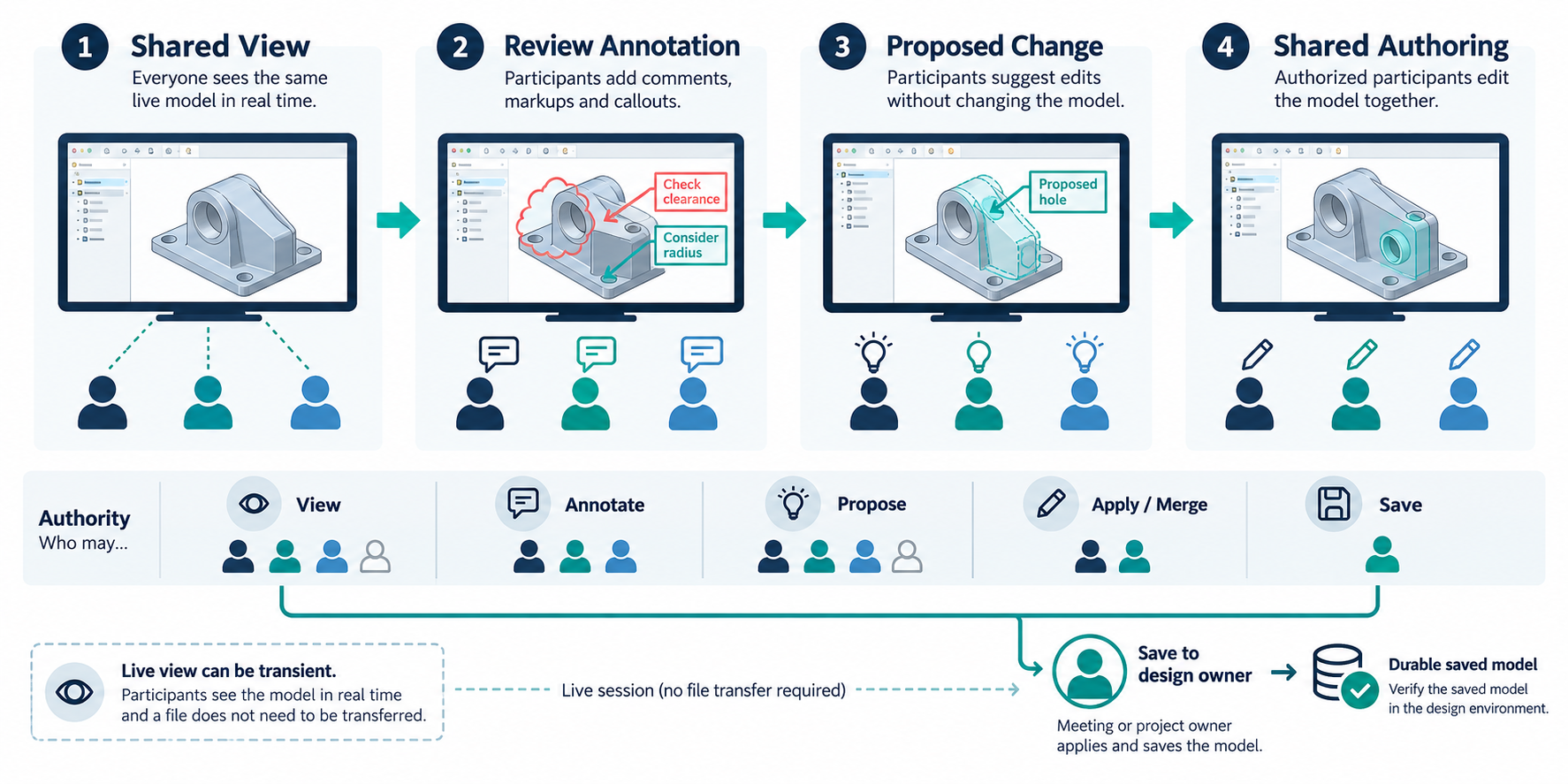
Identify the session result
| Session outcome | Recipient can do | Authority question to settle |
|---|---|---|
| Shared view | Follow or inspect a host’s selected model view | Which model is visible, and can a participant expose a model to others? |
| Review annotation | Add or see markups, notes, or review context | Where are notes retained, and can they be exported or linked to the source? |
| Proposed change | Edit a scoped object or submit a change for review | Who accepts or merges it into the authoritative design? |
| Shared authoring | Make changes visible in a common design session | Who owns and saves the resulting model, and how does the session close? |
These are distinct from a durable BCF issue with a model reference and from a managed package or file handoff.
Trimble Connect Live Collaboration shares views
Trimble describes Live Collaboration as a beta for real-time interaction with participants’ 3D model views without exporting or exchanging 3D model files. Trimble Connect Browser is the base context; Tekla Structures and the Revit add-in are marked Preview. The feature is not supported in Connect for Windows or Mobile. Check current tenant, client, add-in, and project eligibility before planning a session.
Participants must belong to the relevant Connect project and join through the Browser 3D Viewer’s Apps & Capabilities. Joining does not make a participant’s model visible: that participant selects Share. The documented feature comparison also has client differences—for example, markup-tool markups are shared in Connect and Tekla but not Revit, which requires the Revit add-in. A shared view is review context, not a transferred or matched CAD model.
NX Live Share allows edits but the meeting owner saves
Siemens describes NX Live Share for multiple designers working on the same part or assembly. In the described workflow, an attendee may make an assembly change; it becomes visible to others after the attendee confirms it with OK. The meeting starter retains ownership and must confirm and save the final design changes. Attendees cannot save the part.
Before the session, decide whether the owner’s pre-meeting edits should be included and save or reopen the source accordingly. At closeout, the owner can inspect a meeting report showing changes and participants, then select End Meeting to prevent further unsolicited session changes. Siemens warns that a meeting not shut down correctly can permit unplanned changes and multiple versions. The report and close control are session tools; their export, retention, and unsaved-change behavior still need a check in the installed release.
Treat immersive review as a separate authority case
In Siemens’ described Immersive Collaborator review scenario, the owner alone creates annotations; other participants can see them, while participants using the Sony headset can interact with the changes. A sticky note can record a review decision. The source does not establish that annotations are saved with the source CAD model or exported after the meeting. Desktop Immersive Explorer or Immersive Designer can join the described mixed-device meeting without a Sony headset, subject to the cited release context and deployed eligibility.
Close the loop on the saved state
- Identify the exact source model, revision, host, participant clients, release, add-ins, and any beta or preview status.
- List each participant’s view, annotation, proposal, edit, apply, and save rights for the task.
- Capture the starting model state. During the session, record which change was made, by whom, and what others could see.
- Have the design owner confirm the resulting saved state, then close the session and inspect any available report or retained review artifact.
- Perform the required receiving operation on the saved result. If the mechanism establishes only transient view context, state that no durable design change was established.
Use managed CAD sharing for packages and access-state questions, and BCF issues and viewpoints for durable issue context. A live screen is not a substitute for either.
Key points
- View following, annotations, proposed edits, shared authoring, and saved results are different outcomes.
- Trimble Live Collaboration is a beta shared-view route without model-file exchange; named integrations have preview and client limits.
- In the described NX Live Share flow, attendees may edit while the meeting owner controls final save and shutdown.
- Verify the saved model or durable review record after the session; session participation alone is not acceptance.