An AutoCAD drawing handoff can share the drawing itself, a review markup linked to a drawing, or a cloud reference that the receiver must resolve. These routes carry different authority and context. A link, trace, or markup is not automatically a portable DWG package or a proof that the receiver can complete the intended drawing task.
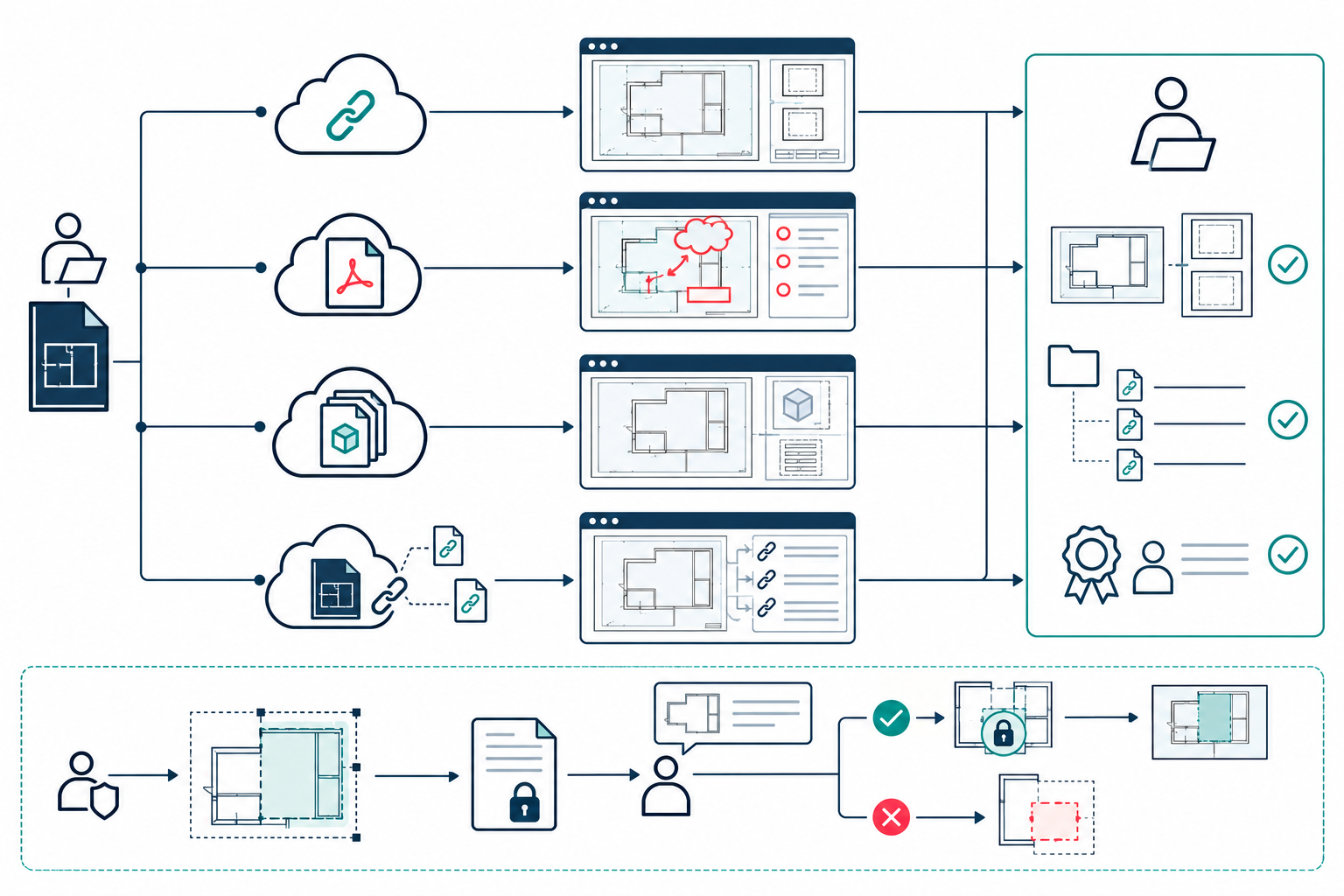
Compare the collaboration routes
| Route | What the receiver gets | Conditions and limits |
|---|---|---|
| Share URL | A link to view or edit a drawing in AutoCAD on the web or mobile; Autodesk documents inclusion of related DWG xrefs and images. | Editing the actual drawing is described for files stored in Autodesk Docs. A drawing outside Docs may be saved as a copy. Access permissions and complete dependency resolution still need checking. |
| Autodesk Docs PDF markup | A published PDF markup can be synced to AutoCAD and imported onto a Trace associated with a drawing or layout. Updates to the Docs markup appear when the drawing or Trace is reopened. | Automatic association requires a Docs drawing, a PDF plotted from AutoCAD for Windows 2025 or later using an Autodesk DWG-to-PDF driver, and Desktop Connector. Other PDFs require manual association. |
| DWF markup set | Markups and sheet context can be viewed in AutoCAD’s Markup Set Manager alongside the original drawing. | The documented AutoCAD route requires the original drawing and a marked-up DWF created by an AutoCAD-based product released in 2005 or later. |
| Connected xref recovery | AutoCAD 2027 may suggest a path for a moved or renamed Forma-hosted external reference. | The documented behavior requires AutoCAD 2027 and Desktop Connector 2027.0 or later. Verify the suggested file and path before accepting it; this is not proof of complete dependency closure. |
Treat markups as review input
Markup Assist can identify text, strikethroughs, and boundary markups on supported imported or synced PDFs. A boundary can be inserted as a revision cloud. Inspect the detected markup and resulting drawing before treating the review as incorporated: feature documentation does not establish detection accuracy for every PDF or show that a particular drawing is correct after an edit.
Autodesk Docs markups remain connected to the PDF and Trace workflow. If the PDF was not produced under the documented automatic-association conditions, manually select and check the drawing and layout. AutoCAD for Mac cannot open and import Docs markups directly, although it can display markups after a Windows recipient has imported them.
Preserve the drawing authority
For a Share URL, record whether the receiver may view, edit, or add markups and whether the drawing is stored in Autodesk Docs. The Docs route can expose the actual drawing to authorized collaborators; the non-Docs route can give a recipient a copy. Do not describe those as the same source-of-truth behavior.
The Share URL documentation says that related xrefs and images are included, but that does not prove every dependency, path, custom object, or recipient task will work. For a cloud-hosted xref moved or renamed in Forma Data Management, AutoCAD 2027 with Desktop Connector 2027.0 or later can attempt to locate it and show a suggested path in the External References palette. Check the target against the expected project before accepting it, then inspect the rest of the drawing’s references.
AutoCAD 2027’s object-level Checkout is another authority pattern: a read-only collaborator edits supported drawing geometry in a Trace and submits a proposal; the read-write owner decides whether to merge it. Specialized-toolset custom objects are excluded, and AutoCAD Electrical does not support Checkout. This proposal is neither a shared DWG save nor proof the owner accepted the change. See DWG release boundaries for its relationship to a native drawing handoff.
AutoCAD 2026.1.1 Sheet Set Manager reports sheet-set status, concurrent edits, and real-time conflict notifications. Autodesk also warns about compatibility issues when working with sheet sets between AutoCAD 2026.1.1 and Civil 3D 2026 or 2026.1; the enhanced supported workflow was still pending in the cited release page. Activity Insights stores records at a configured location that must be shared for collaboration; version comparison requires a supported cloud provider. AutoCAD LT currently displays only Version activities, and AutoCAD mobile has no Activity Insights palette. These are source-state and review cues: a conflict notice, version comparison, or activity entry does not establish that a markup was correctly applied or that the drawing task passed.
Choose and validate the route
- Decide whether the receiver needs the drawing file, an editable source, issue context, or a review overlay.
- Freeze the drawing release, storage location, AutoCAD platform, Desktop Connector version, permissions, PDF or DWF origin, and layout.
- Name the xrefs and other dependencies required for the review or editing task.
- Have the intended recipient open the link or markup using the actual receiving product and account.
- Confirm model/layout association, reference paths, sheet context, and markup visibility.
- If a markup is acted on, inspect the resulting drawing objects and perform the intended review, edit, plot, or coordination task.
Key points
- Share URLs, PDF Traces, DWF markups, and cloud xrefs have different payloads and authority.
- A markup or issue view carries review context; it does not replace the drawing handoff.
- Product, platform, storage, permissions, and version conditions are part of the route.
- Verify the receiver’s actual task and every required dependency.