Native DWG collaboration is often a release-management problem before it is a file-transfer problem. A newer AutoCAD release can generally save, open, and edit older DWG formats, while an older release cannot open a newer DWG format. That directionality makes the chosen save target part of the handoff contract.
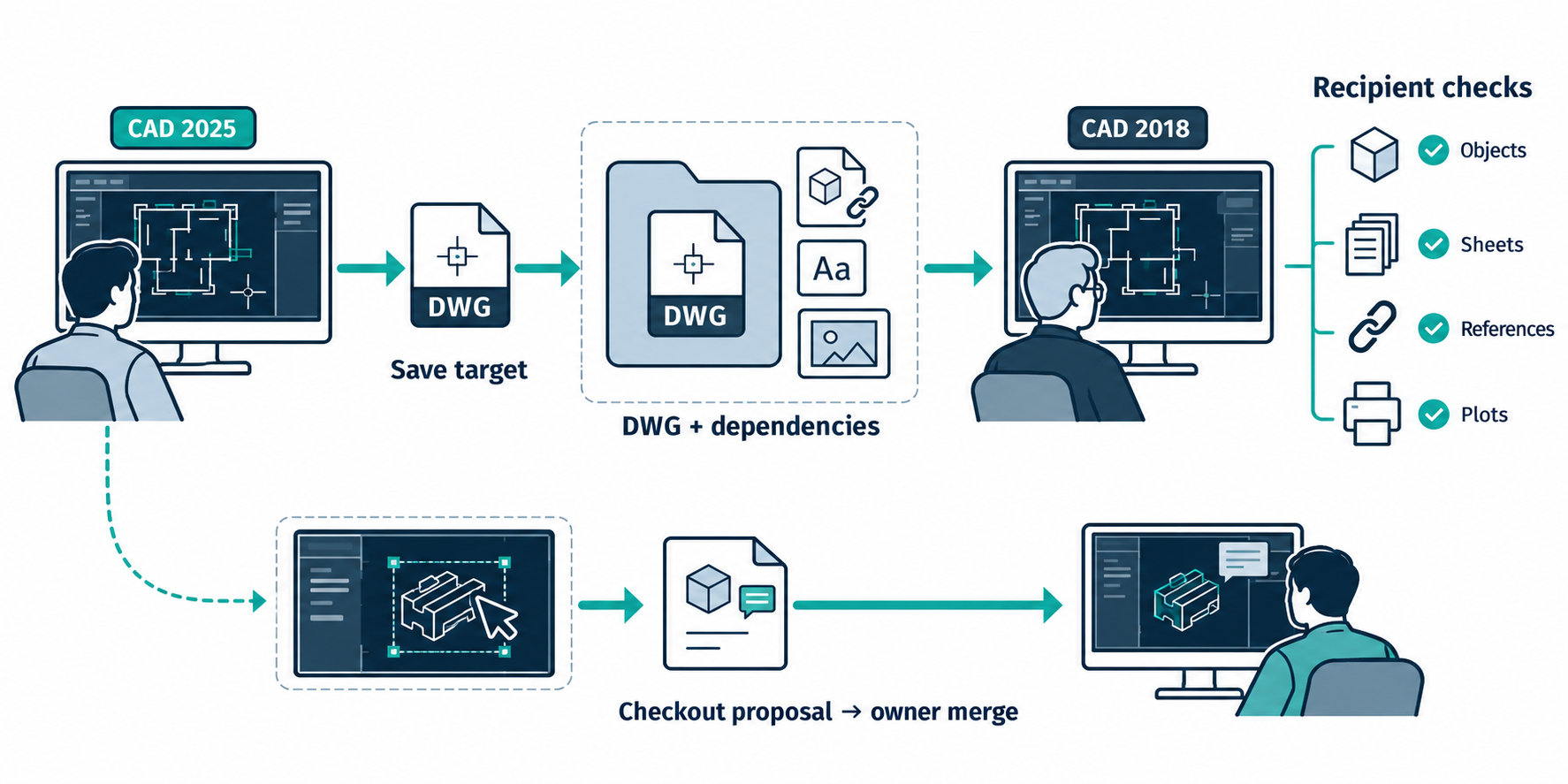
Route card
authoring AutoCAD product and release
→ selected DWG save target and dependency package
→ recipient product and release
→ inspect, edit, plot, or coordinate the drawing
Before delivery, record the drawing’s object types, external references, fonts, sheets/layouts, vertical-product content, required plots, and the recipient’s actual product release. A .dwg suffix does not identify all of those conditions.
Understand the release direction
Autodesk’s compatibility guidance says AutoCAD-based products save by default in the DWG format current at their release, and the setting can be changed in Options. The cited native-format table groups releases as follows:
| AutoCAD releases | Native format shown by Autodesk |
|---|---|
| 2018–2027 | AutoCAD 2018 |
| 2013–2017 | AutoCAD 2013 |
| 2010–2012 | AutoCAD 2010 |
| 2007–2009 | AutoCAD 2007 |
| 2004–2006 | AutoCAD 2004 |
| 2000–2002 | AutoCAD 2000 |
| R14 | AutoCAD R14 |
| R12 | AutoCAD R12 DXF |
The practical rule is directional: a newer release can save to an older format and a newer product can open the older file; an older release cannot open a newer DWG format. Autodesk’s example says AutoCAD 2017 cannot open the AutoCAD 2018 format, while AutoCAD 2018 can open a drawing saved by AutoCAD 2025 to the AutoCAD 2018 format.
The same guidance names AutoCAD Mechanical as an exception to the general common-format statement because it uses its own Mechanical DWG format. Check the exact product family instead of assuming that “AutoCAD-based” means identical object behavior.
Backward saving can change the drawing
Saving a current-release drawing to an earlier format can strip information specific to the current release or convert it to another object type. Autodesk recommends a different filename because the operation may cause data loss. The documented no-loss condition is narrower: a previous-release drawing opened in the current release may be saved back without loss if no current-release-specific information was added. That condition does not generalize to converting a current drawing backward.
Autodesk’s examples of earlier-format limits include:
- drawing views created by a newer version may display in an older version but not be editable there;
- in R12/LT2 DXF conversion, solids, bodies, regions, ellipses, leaders, multilines, rays, tolerances, and xlines can be converted to simpler line, arc, or circle forms;
- groups, complex linetypes, OLE objects, preview images, multiple layouts, and some external-reference state can be lost; and
- encryption and digital signatures are not preserved in the cited Release 2000 format case.
These are selected documented limits, not a complete object-loss matrix. Vertical-product objects, custom content, annotations, and recipient workflows need their own checks.
Distinguish native opening from foreign import
AutoCAD’s IMPORT documentation describes bringing files from other applications into the current drawing and translating the data into corresponding DWG file data. It also warns that listed formats may not be available in every AutoCAD-based product.
That operation is different from opening a DWG in its native release family. A foreign-file import creates destination DWG data; it does not establish preservation of source-native history, references, annotations, or every object class. Record the operation accurately in the route dossier.
Package dependencies deliberately
Autodesk documents ETRANSMIT as a command for packaging a set of files for transmission. When drawing files are selected, it automatically includes related dependent files such as external references and font files. The command-line form, -ETRANSMIT, exposes options at the command prompt.
This is useful evidence that a concrete DWG collaboration route can have a dependency-packaging step. It is not proof of complete dependency closure, successful path resolution on the recipient’s machine, or preservation of object and annotation semantics. Treat the named xrefs and fonts as examples, not an exhaustive dependency list.
A checked-out Trace is a proposed edit, not a DWG handoff
AutoCAD 2027 documents object-level Checkout for drawings stored in Forma Data Management. A read-only collaborator selects supported geometry, edits it in a Trace workspace, and submits it for review. The collaborator with read-write access receives the proposal and decides whether to merge it into the drawing. While the objects are checked out, they are locked against editing by the read-write collaborator.
This is a scoped proposal-and-merge workflow, not a backward-save or portable-file conversion. Specialized-toolset custom objects are excluded from Checkout, and AutoCAD Electrical does not support it. Check the selected objects, release, storage context, and merge result; the focused AutoCAD cloud and markup guide compares this with drawing links and review overlays.
Recipient acceptance checklist
Use the recipient’s actual product and release for the check:
- Open the delivered file without repair prompts or unresolved required references.
- Confirm that the expected sheets, layouts, layers, blocks, annotations, vertical-product objects, and external references are present.
- Check the required dimensions, coordinates, units, plot settings, and visual output.
- Perform the intended task: inspect, edit, plot, coordinate, or prepare the next supplier handoff.
- Compare any objects documented as converted or at risk during the backward save.
- Record missing, simplified, uneditable, or unresolved content and decide whether the drawing is accepted, accepted with restrictions, or needs another route.
Do not make the recipient responsible for discovering the save target after delivery. Put the target release, product variant, package contents, and known limits in the handoff record.
When native DWG is not enough
If the recipient needs only a view or plot, a separate rendered deliverable may be appropriate alongside the native file. If the receiving product cannot use the required objects after a backward save, consider a neutral or mediated route for the information layer that matters, and state which native behavior will no longer be expected. A package solves dependency delivery; it does not undo a representation conversion.
Key points
- Newer and older DWG releases are not interchangeable in both directions.
- The save target and product family are part of the route identity.
- Backward conversion can strip, simplify, or make objects uneditable.
ETRANSMITcan include named dependent files, but recipient resolution and task acceptance still require testing.