A direct translator is a route mechanism, not a universal bridge. It may be a destination reader, a source writer, or a third-party translation path. The direction, supported release range, product edition, options, and model content all shape the result.
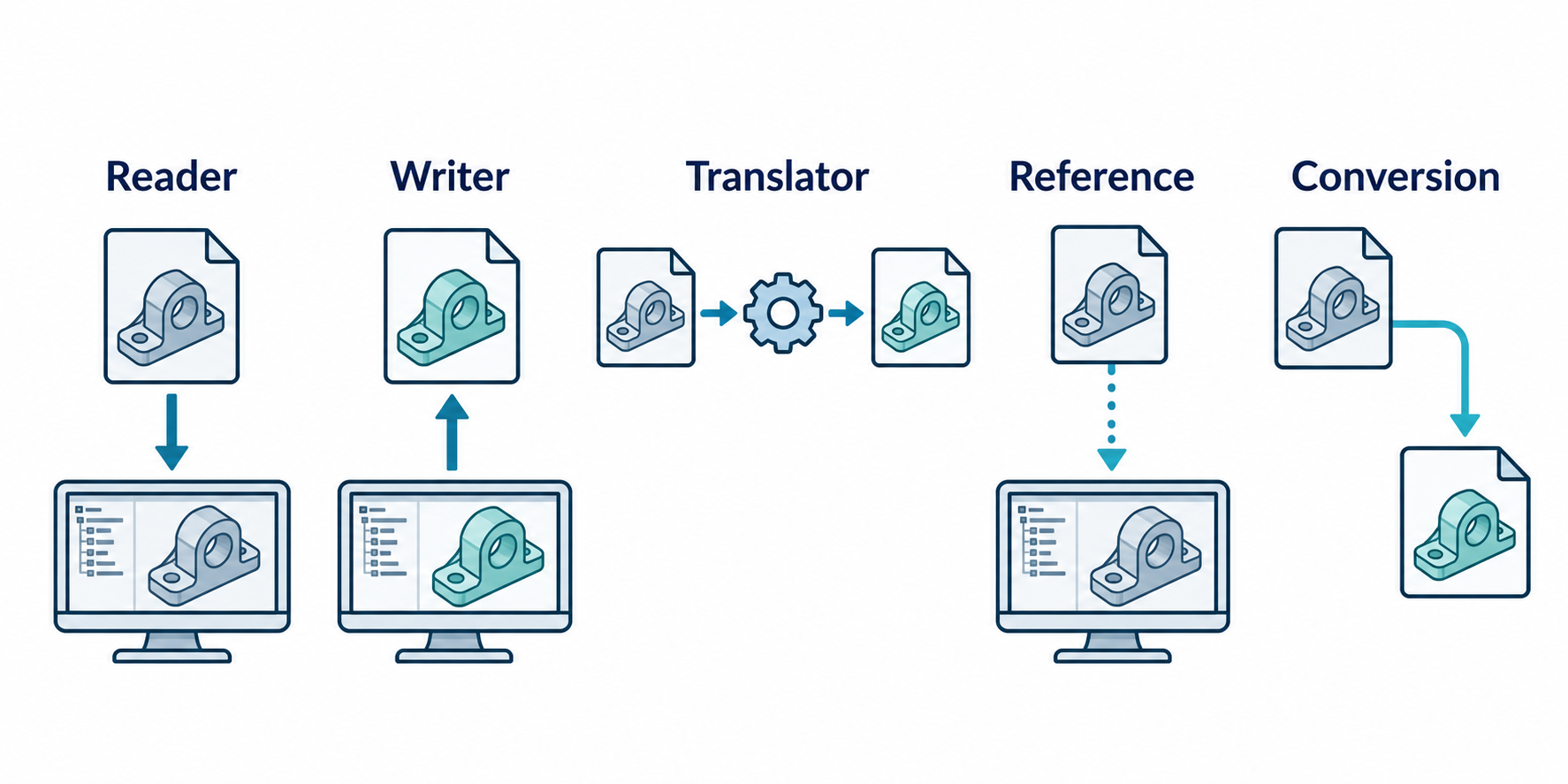
Separate the mechanisms
Use these terms precisely:
| Mechanism | What happens | Main continuity question |
|---|---|---|
| Direct reader | The destination opens or imports a foreign file. | What representation does the destination create, and what can the recipient do with it? |
| Direct writer | The source exports or publishes a file for another environment. | What does the writer emit, and which receiver/profile is it intended for? |
| Third-party translator | A separate tool reads and writes between systems or formats. | Which side owns the settings, licenses, versions, and diagnostics? |
| Reference route | The destination keeps a link to the source file. | Can the link resolve and update, and is editing the referenced model required? |
| Conversion route | The destination creates a new local representation. | Which information is now local, and what is no longer linked to the source? |
An import or export entry does not, by itself, answer whether feature history, assembly identity, PMI, metadata, or references survive.
Read a support matrix as a bounded statement
Autodesk’s Inventor 2026 translator table separates import and export columns and includes explicit release or protocol ranges. Examples include:
- SolidWorks import from 2006 through 2025;
- STEP import and export for AP214, AP203E2, and AP242;
- DWG import for all revisions, with selected DWG export targets; and
- USD export at version 1.0.
The correct reading is “Inventor 2026 documents this translator boundary in this direction.” The incorrect reading is “every model in this row will retain all information and work for every downstream task.” The table does not specify every setting, option, license, field mapping, or acceptance test.
Treat the support row as the first filter in a route dossier. Confirm the actual source and destination release, product variant, file profile, configuration, options, and required information layers before relying on it.
Reference is not conversion
Inventor’s AnyCAD guidance provides a useful concrete distinction. A Reference Model maintains a link to the selected file so the design can be monitored and updated; Autodesk positions it for an evolving design that does not need to be edited in Inventor. Convert Model creates a new Inventor file that is not linked to the original and is intended for modification in a new design.
That is a continuity choice, not a claim about universal preservation. A missing reference opens a resolve-link workflow. A converted model can be locally useful while losing the source’s update relationship. Record which authority owns the model and whether later changes must return to the source.
The same Inventor dialog exposes filters for solids, surfaces, meshes, graphical PMI, wires, work features, points, and UCS geometry. Autodesk qualifies mesh data as for visualization purposes only in this workflow. Assembly conversion can preserve source structure, create a multi-body part, or create composite or individual part results. These options change the destination representation; they do not prove source feature-history equivalence.
Read the current Inventor matrix by release
Inventor 2026 and Inventor 2027 have separate translator tables. The 2027 table, for example, lists SolidWorks import through 2026 and Creo Parametric import through 12.0; it lists STEP AP203E2, AP214, and AP242 for both import and export. Autodesk separately lists selected AnyCAD reference-model formats with selective import and associative update. Keep the exact Inventor release in the route record: a newer support row changes eligibility, not the evidence needed for preservation or acceptance.
An AnyCAD reference can also cross a release boundary where Autodesk documents it: Inventor 2026.3 lists a reference workflow for Inventor 2027 parts and assemblies. That is a version-specific reference route, not a conversion or a guarantee that later edits work in every destination. Record the source version and reference command, then test the update in the receiving assembly.
A documented omission can change the route
AutoCAD 2026 Core documents direct import of Inventor parts and assemblies as solid bodies, but reports that an Inventor assembly containing assembly features is not imported by that translator. Autodesk gives STEP or SAT export followed by AutoCAD import as a fallback. Product availability can vary across AutoCAD-based products, and the fallback changes the representation; neither route establishes that assembly features or the receiving task survive. Check the exact product, model, and result before selecting it.
Check the receiver’s own limits
The destination may publish a more specific boundary than the source matrix. Onshape lists STEP AP203, AP214, and AP242 for part and assembly import, with geometry and face color as the stated import scope. Its imported-CAD guidance also says that foreign data has no feature tree. An imported part can be updated from a new source export and target features are reapplied where possible, but those features can enter an error state; the documented update operation changes the Part Studio, not the Assembly. These statements define a receiver workflow, not a paired preservation result.
SOLIDWORKS 3D Interconnect gives another bounded example. It can insert third-party CAD without conversion, retain an associative link, update downstream SOLIDWORKS features, and break the link when local ownership is needed. The receiver documentation identifies selected readable fields—such as material name and density, mapped custom properties, and unconsumed sketches or curves—but not complete feature-history or semantic preservation. Treat an “update available” or associative-link capability as a route state to test, not as proof that every source change will arrive safely.
Keep import context and connector intermediates explicit
Some paths depend on a selected assembly context, reference mode, sender profile, or intermediate file. SOLIDWORKS can insert supported third-party CAD into an assembly through its documented reader/link workflow; inspect the inserted component, source link, and selected properties rather than inferring a full source history. MicroStation’s DWG workmode/reference choices and AutoCAD’s DGN export limits are release-specific: establish whether the route references or merges data and which objects are converted before calling it a DGN↔DWG route.
For cloud synchronization through Bentley iTwin, select a listed connector and its version-specific input. The synchronization service operates on connector-processed models; it is not a generic native CAD reader. A DGN intermediate or Revit connector setting is a separate route condition, and a generated iModel is not evidence that source semantics or recipient acceptance survived. For electronics/mechanical coordination or visual delivery, use the focused CoDesigner/IDX and Datasmith guides rather than reading their support tables as direct CAD translators.
Check product and entitlement boundaries
The receiving application may have several editions with different route capabilities. Autodesk’s VRED comparison identifies CAD import for Learning Edition, Design, and Professional, while Presenter is not available in the CAD-import row. The comparison lists USD export for Design and Professional; Learning Edition is limited to VPB and OSB export in the cited row, and Presenter has no file export there.
Use the exact edition and installer in the route record. Product-level availability is not an individual license check, and neither one establishes field preservation.
Turn the matrix into a test plan
For a route that matters, use a small but representative asset:
- Freeze the source and destination releases and identify the translator or product edition.
- Record format/profile, direction, import/export settings, units, coordinates, and dependency locations.
- Include the information layers the real task needs: for example, a part with critical geometry and PMI, or an assembly with repeated components and external references.
- Capture translator warnings, logs, skipped entities, unresolved links, and destination representation.
- Test the receiving operation itself—edit the required feature, identify components, inspect annotations, render the scene, or manufacture the selected output.
- Record what was not tested. A successful visual import is not evidence for hidden structure or editability.
Use an alternative when the direct route is too weak
If the direct path does not expose the required evidence, choose the mechanism that matches the need:
- use a neutral representation when cross-ecosystem transfer matters more than source-native history;
- use a reference when update linkage matters and the destination need not own the model;
- use a controlled package when external files, fonts, textures, or references are part of the deliverable; or
- deliver a separate representation for a separate purpose, such as exact geometry for engineering and tessellated scene data for visualization.
Do not call the route “unsupported” solely because a matrix is silent, and do not call it “compatible” solely because a row exists. State the evidence boundary and test the purpose.
Key points
- Import and export are directional claims with their own release ranges.
- Reference and conversion modes express different ownership and update expectations.
- Product editions, options, and licenses can change route eligibility.
- A support matrix starts a preservation hypothesis; a receiving-task test completes the claim.