An electronics/mechanical handoff may be a Workspace-mediated change exchange, a file-based IDX baseline and update, or a static shape file. These routes do not carry the same objects or authority. Start with the board, device, or harness task and verify the exact ECAD, MCAD, extension/add-in, and data-management versions.
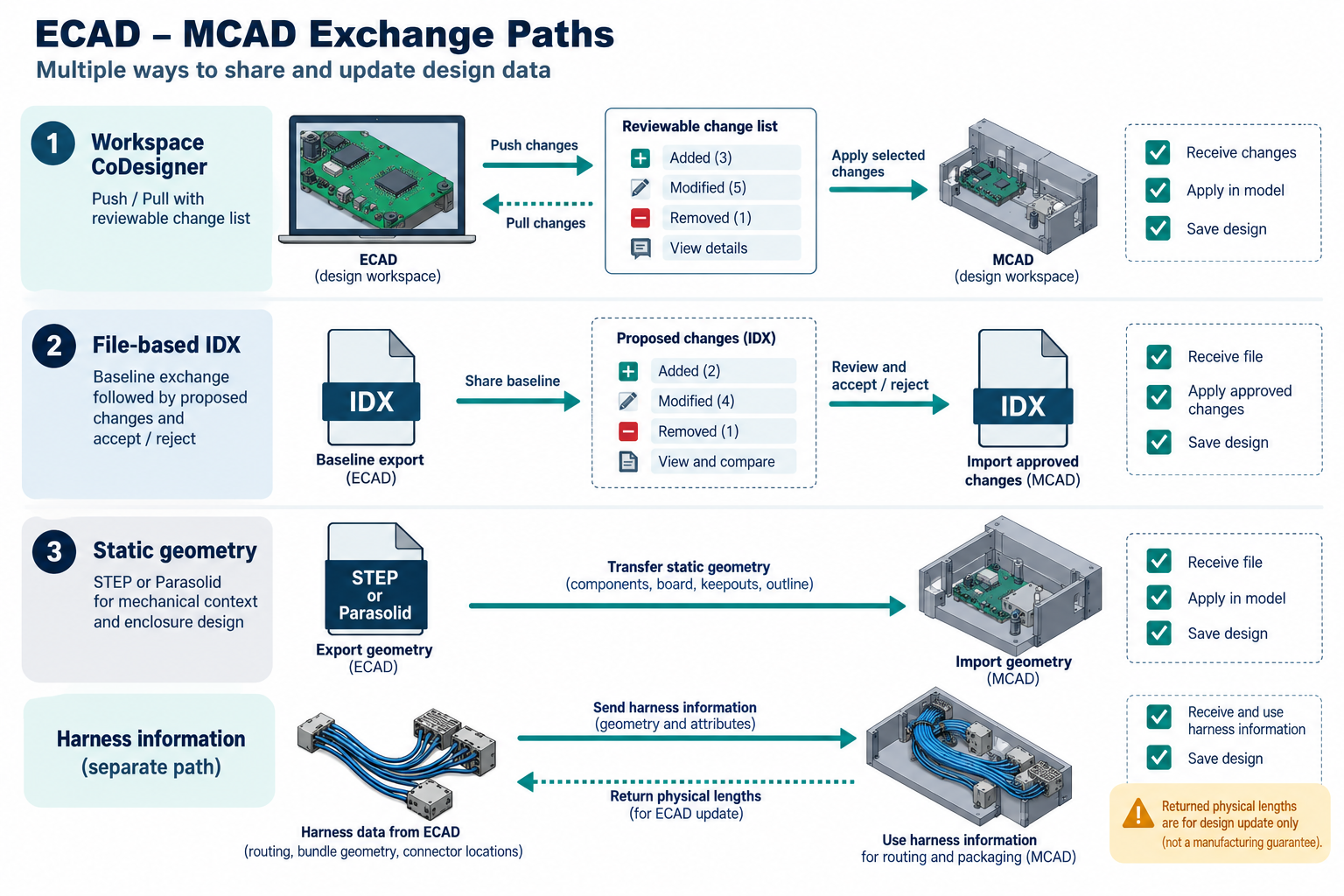
Choose the mechanism by the change required
| Mechanism | What the sources describe | What remains to test |
|---|---|---|
| CoDesigner through an Altium Workspace | Push/pull of ECAD–MCAD design changes with a recipient change list | Eligible client pair, object/property scope, variant, ignored or accepted changes, and what is saved on each side |
| IDX Changes files | File-mediated baseline/change exchange between the PCB and an agreed MCAD implementation | Detected change classes, receiver handling, board-outline constraints, and exact direction |
| STEP or Parasolid geometry | A selected shape deliverable or component geometry path | Component placement and the specific enclosure task; this does not establish continuing synchronization or electrical design meaning |
Do not infer Workspace/IDX interchangeability from a shared ECAD–MCAD purpose. A successfully pushed package is not the same as an applied and persisted design change.
Check client and component eligibility first
CoDesigner is a Workspace-mediated bridge, but the Altium extension and MCAD add-ins update separately from the ECAD application. Use the current compatibility table for the installed host, extension/add-in, entitlement, and PDM/PLM connection rather than combining product names from an overview into one supported configuration. Workspace membership and project access are also part of the route.
CoDesigner normally transfers component models as Parasolid geometry. Native component links are optional and more restricted: they require the ECAD and MCAD component models to be geometrically the same, including aligned origins. Altium’s documentation lists MCAD-to-ECAD linking for the supported MCAD packages except Fusion; ECAD-to-MCAD linking is limited to Creo connected to Windchill, SOLIDWORKS connected to PDM Professional, and NX connected to Teamcenter at the stated add-in versions. Where a mapped MCAD object is unavailable, the transferred ECAD model is used instead. Treat a link as a dependency, not proof that all recipients can resolve the native source object.
Keep board and device-assembly changes separate
Synchronize a multi-board design at two levels. Each PCB is synchronized independently; a device-assembly push can then transfer PCB locations and orientations plus objects designated as enclosure content. Changes to an individual PCB still need a board-level push. Record the active board variant: base-design component changes affect all variants, while variant-specific changes apply only to that variant. An ignored change may reappear at a later sync and can be overwritten by a later push from the side that retained the old value.
For rigid-flex, confirm the selected standard or advanced mode and validate the MCAD bend conditions in the exact installed pair. Altium documents that thickness, radius, angle, and distance to region boundaries affect bend creation; an ECAD push can succeed while an MCAD bend fails. Unsupported operations or board-outline edits can break constraints. The exact versioned rigid-flex source could not be captured in the active evidence record, so verify current installed guidance before relying on a mode-specific procedure. This is not paired geometry evidence.
Treat harness exchange as directional
Altium documents connectors, splices, from-to connectivity, and harness topology moving from ECAD to MCAD; MCAD routing can return physical wire, cable, and segment lengths to ECAD. The described return does not rebuild harness topology in the ECAD layout drawing, so that topology must already be specified there. Creo and SOLIDWORKS use different MCAD representations and have different topology/update constraints. Do not infer one system’s connection-point behavior or a manufacturing-ready harness from the other.
Keep the IDX boundary visible
The file-mediated IDX Changes workflow handles selected proposed changes for review and import. Altium’s documentation excludes copper changes from the listed detection. It also describes STEP (AP214 recommended where possible) for initial board-shape intake; this baseline shape transfer is separate from the subsequent IDX changes.
Any ECAD board-outline change may redraw the complete board sketch in MCAD and change board-edge IDs. Constraints attached to those edges or derived surfaces can break, even if the board remains located. The cited guidance says CoDesigner does not manage arbitrary MCAD constraints. Check component placement after ECAD changes that move components, and plan manual constraint restoration or rerouting where needed.
Run a bounded receiving test
- Record the selected board, variant, device assembly or harness state and its source authority.
- Freeze the ECAD/MCAD releases, CoDesigner extension/add-in, Workspace/PDM connection, or IDX implementation and file version.
- Test a representative baseline and one controlled change. Inspect the recipient’s change list before applying it; then confirm the saved state on the authoritative side.
- For board/device work, compare required placement, component identity, enclosure objects, and constraints. For harness work, inspect connectivity/topology and returned lengths separately. For rigid-flex, validate bends in the receiving MCAD.
- Record unrecognized, ignored, repeated, or manually repaired changes. Route constraint recovery to the repair guidance and define electrical or manufacturing acceptance with the responsible domain team.
Key points
- CoDesigner Workspace updates, IDX Changes files, and static geometry are different routes.
- Match host, add-in/extension, entitlement, PDM/PLM, variant, and model state before exchange.
- Proposed changes must be reviewed and applied; a push does not prove the final saved result.
- Harness and rigid-flex behaviors are directional and product-specific, with recipient checks still required.