A CAD-to-VRED-to-USD handoff is a mediated visualization route. It has at least three independent questions: can VRED read the selected CAD source, can the installed VRED product export the intended USD form, and can the receiving visualization application resolve and render the delivered scene as required? A positive answer to one does not prove the others.
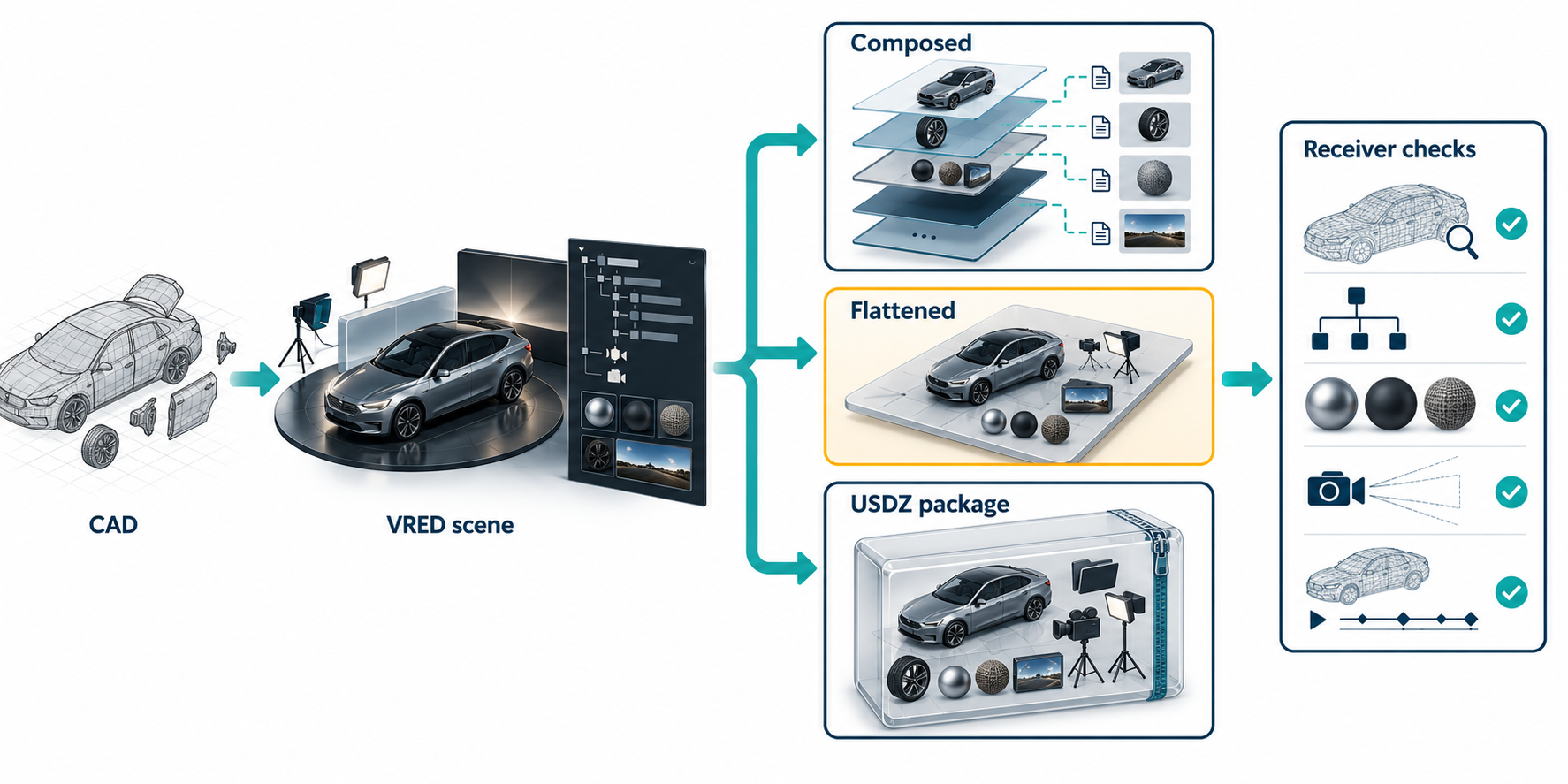
Route card
| Stage | What to freeze |
|---|---|
| CAD source | Product and release, source format, model state/configuration, units, coordinates, and external assets. |
| VRED import | VRED release, product edition, CAD reader, import settings, and the resulting scene representation. |
| USD delivery | .usd, .usda, .usdc, or .usdz; export settings, asset paths, references, and whether the stage is composed or flattened. |
| Visual receiver | The actual application/version, resolver configuration, required cameras/materials/animation, and the visual task. |
| Acceptance | The views, scene relationships, assets, transforms, and output checks the receiver must pass. |
Named receiver documentation is available for Blender 5.2 and the Omniverse Unity Connector, but neither source reports a paired test of VRED output. Blender documents limits around USD layers and references, and notes that Preview Surface materials can become approximate Blender materials. The Unity Connector documents conversion limits for materials and lights, and says that nested USD files named by references or payloads are not imported by its documented workflow. These are receiver-specific checks, not evidence that VRED scenes preserve the same content in either application.
The current evidence still establishes no VRED-to-receiver paired test or visual-equivalence result. Record the receiving application and release, resolver and asset setup, material and lighting needs, and required views. Open the actual delivery in that receiver and verify it against the declared visual task.
Separate CAD reading from USD writing
Autodesk’s VRED 2026.2 table lists CAD import ranges independently from USD support. Examples include Inventor .iam and .ipt up to Inventor 2026, SolidWorks part and assembly extensions from 2001 Plus through 2025, and STEP AP214, AP203E2, and AP242. The same page lists .usd, .usda, .usdc, and .usdz for USD import and export. VRED 2026.2 is documented as using ATF 14.23.0 and exporting USD among other formats.
These are separate support statements. They do not establish a complete mapping from every source-CAD entity to a USD scene, nor do they prove that a receiver will render the result equivalently. Confirm the exact VRED release and source range; support-table ranges are not a substitute for testing the selected model.
Respect the VRED product boundary
Autodesk’s product comparison distinguishes editions. CAD import is shown for Learning Edition, Design, and Professional, while Presenter is not available in the CAD-import row. The comparison lists USD export for Design and Professional; Learning Edition is limited to VPB and OSB export in the cited row, and Presenter has no file export in that row.
Treat the edition, installer, and enabled importer/exporter as route prerequisites. Product-level documentation does not verify a customer’s entitlement or prove preservation of a particular scene.
Define the visual preservation map
The VRED documentation describes a bounded USD implementation, not a complete interchange guarantee.
| Scene layer | Documented boundary or acceptance question |
|---|---|
| Geometry | VRED documents tessellated geometry for USD exchange. Test whether the resulting approximation is sufficient for the visual task; it is not exact CAD or feature-history evidence. |
| Graph structure | Graph structure and node names are supported for application organization. Compare the hierarchy needed by the receiving task. |
| Textures | Imported and exported image textures and UV mappings are supported, but the documented statement concerns the texture file and UVs, not every material dependency or path. |
| Materials | Basic diffuse-color export is documented. Do not treat it as shader, appearance, or rendered-equivalence preservation. |
| Cameras | Basic camera import/export is documented, including transforms, clipping, type, sensor size, field of view, and name. Camera constraints are not taken into account. |
| Animation | Basic linear animation curve interpolation is documented, including polygon-mesh keyframe animation. Test timing and the actual animated objects. |
| Metadata | Metadata export is supported, but the exact metadata classes and receiver behavior remain route-specific. |
| Transforms/units | Record the source and scene transform/unit interpretation and inspect the receiver; the support table alone does not establish a correct result. |
Use “documented support,” “observed in this scene,” and “accepted for this visual task” as separate labels.
References, flattening, and packages are different
OpenUSD references bring scenegraph contents from a source layer into a target stage. An over can add non-destructive opinions for properties, metadata, and composition operators. The referenced identifier may be resolved by an asset-path resolver or file-format plugin; it need not be a file on disk. This makes the resolver context part of the delivered route. A receiver that lacks the expected resolver, layer, or asset access may not see the same composed scene.
Flattening changes that dependency model. OpenUSD’s UsdStage::Flatten creates a single merged layer and authors resolved values directly into it. The documented transformation removes most composition metadata; variant sets are removed with only the selected variants present, inherited data is copied to child objects, and deactivated prims are pruned. Exporting a stage writes the composite scene as a flattened layer. Flattening can therefore improve self-containment for a selected result while removing the composition and update behavior that made the source stage useful.
Packaging is a separate operation. The OpenUSD toolset documents usdzip for creating and inspecting USDZ packages from USD assets and referenced assets. Its --asset option takes a resolvable root-layer asset path to isolate and copy into a package; --checkCompliance can prevent package creation when checks fail, and usdchecker provides a separate USD/USDZ validation operation. These tools do not establish complete closure for every resolver setup or prove that a named receiver renders the intended scene.
If the delivery is USDZ, package rules become part of the route. The USDZ
specification defines an uncompressed, unencrypted ZIP package containing
permitted USD, image, and audio types. A Default Layer is the stage entry point;
the package can select a root USD file by its layout or an explicit
defaultLayer.usd convention. USDZ is read-only in place, so editing requires
unpacking its constituent files. Package-relative resolution tries the
authored-layer location, then the package Default Layer, then the installed
external resolver. Anchored ./ or ../ paths are recommended when uniform
consumption is important. usdzip can recursively localize referenced files,
but custom or dynamic resolver behavior still needs route-specific inspection.
Receiver-side acceptance procedure
- Preserve the source CAD scene, the VRED scene, and the exact USD/USDZ output.
- Record VRED release, edition, ATF context, import/export settings, USD flavor, and resolver configuration.
- Run structural/package checks and inspect the Default Layer, unresolved asset paths, external layers, textures, and fonts. For USDZ, record path style and whether the package is read-only for the receiving workflow.
- Open the delivery in the actual receiver. Check the required node hierarchy, transforms, cameras, texture paths, materials, lights, and animation.
- Compare the declared visual views or outputs, including any required variants. If the stage was flattened, confirm that the selected variant is the intended one and that lost composition behavior is acceptable.
- Record what is not proven: exact CAD geometry, source feature history, engineering semantics, native references, untested metadata, and general visual equivalence.
Accept the package only for the stated visual task. A valid USD or USDZ structure is not the same as a successful receiver render.
When to choose another deliverable
Use a composed/reference stage when collaborative overrides and updates are part of the task and the receiving pipeline can reproduce the resolver context. Use a package or flattened result when the receiver needs a self-contained selected scene, but verify what composition behavior or variants are intentionally lost. Keep an exact or neutral CAD deliverable separate when engineering geometry, PMI, structure, or editability must survive.
For a design-application-to-Twinmotion handoff, the Datasmith route guide covers a separate exporter, scene-file, and asset-folder workflow. Its Direct Link and Unreal continuation have different dependencies and receiver checks; Datasmith support does not establish VRED-to-USD behavior or vice versa.
Key points
- CAD import support, VRED USD export, and receiver acceptance are separate route stages.
- VRED’s documented USD support is bounded: tessellated geometry, basic cameras/animation, diffuse colors, textures/UVs, graph organization, and metadata have distinct limits.
- References depend on composition and resolver context; flattening and packaging change different parts of that model.
usdzipandusdcheckerhelp inspect a package, but neither proves receiver-side visual acceptance.