For a building model, a mechanical product often needs a useful envelope, placement, clearances, mounting points, or selected properties—not its full manufacturing detail. Inventor’s documented assembly-to-RVT workflow creates a Revit model from a deliberately selected representation. It does not establish a measured Inventor/Revit result or native Inventor feature-history transfer.
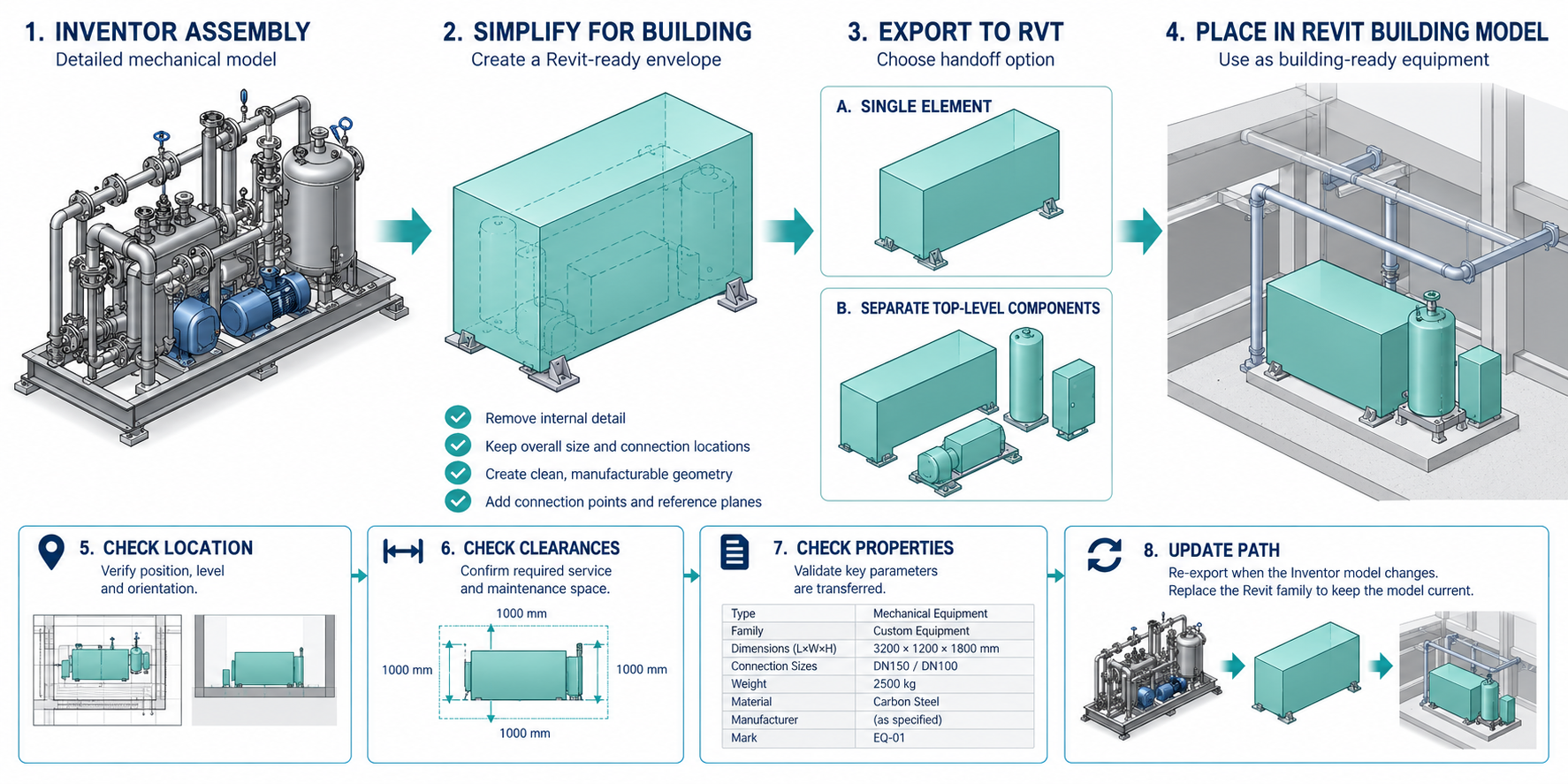
Define the building task and the accepted source
Record the Inventor release, assembly, model state/design view, position, selected components, and any source references. State whether Revit needs an envelope for coordination, separate items for scheduling, property-bearing objects, or another named operation. Do not simplify before agreeing what detail the receiving task requires.
Inventor 2026’s assembly-level Simplify command replaces Shrinkwrap and Shrinkwrap Substitute and can output a new part, substitute Model State, or RVT. It is integrated into RVT export. Simplification can remove components and features; it is deliberate content reduction, not a lossless conversion setting.
Select detail and output structure
| RVT structure option | Documented result | Boundary to check |
|---|---|---|
| All in One Element | One Revit element represents the simplified assembly | Property selections are unsupported with this option |
| Each Top Level Component | Separate Revit elements for first-level components | Does not promise deeper native assembly structure |
| Parts Only | Separate Revit elements for individual parts in the simplified model | Does not preserve Inventor feature history |
Suppressed components in the selected Model State and invisible components in the selected design view are not exported. The documented associative design-view option cannot be used with a primary design view. Review the selected source state, selection set, and output element structure before sending the model.
Match the Revit engine and placement
Inventor assembly export requires the matching Revit Core Engine (RCE). Check the installed Revit output version and RCE before starting the export; the prompt to install or update an engine is not a receiver test. Record placement/orientation and the target Revit model/template, then inspect the delivered element at the intended building location.
Mesh objects do not export to RVT. If an assembly contains only mesh objects, the resulting file is empty. A Revit 2026 output can optionally include a separately named IFC file, but the two files are distinct outputs and their receiver behavior must be checked separately.
Keep properties and updates within their documented limits
Custom, instance, standard, and factory properties can be selected for inclusion, but the All in One Element structure does not support property selection. Autodesk also states that properties previously included cannot be removed by a later edit. Inspect the receiving Revit parameters and categories; an export choice is not evidence that a property has the required project meaning.
If update is enabled, Inventor retains criteria in a browser node for an on-demand incremental update. The exported RVT must remain at its stored location. Moving or renaming the output breaks the stored update association; restoring the original path or recreating the export node is required by the documented workflow. Treat that file location as a route dependency, not an archive or update-correctness guarantee.
The Inventor/Revit matrix distinguishes RVT, IFC, RFA, neutral-file, and service-based routes by direction and stated payload. A label such as “associative” does not establish update correctness. Choose an alternative only after verifying its exact source, recipient, service access, and task separately.
Check the receiving Revit task
- Open the RVT in the intended Revit release and model; confirm placement and orientation against agreed project coordinates.
- Compare the selected geometry/envelope and clearances with the accepted source state.
- Inspect element grouping, category, identity, and each required property in Revit.
- Perform the actual building operation, such as coordination or schedule review, with the receiving owner.
- If continued update is required, make one controlled source change while preserving the exported path, run the update, and compare affected elements and properties.
- Record omitted detail, mesh-only inputs, unresolved dependencies, or untested updates. Do not infer manufacturing suitability from a simplified building component.
For whole-model IFC, cloud subsets, and civil routes, see BIM and Civil Exchange Routes. This article covers the narrower mechanical-product-to-building-component task.
Key points
- Choose simplification and object structure from the receiving building task.
- Match the RCE and Revit output release; keep the RVT path if updates depend on it.
- Validate placement, selected properties, object grouping, and the actual Revit operation.
- A documented export is not proof of complete mechanical information, native history, or BIM acceptance.