BIM and civil exchange is not one route. A team may need to transfer an IFC model for coordination, share a selected set of objects through a cloud exchange, or move surfaces and survey-related data through LandXML. Choose by the recipient’s task and the information that must arrive, then freeze the schema, settings, versions, dependencies, and checks that make the handoff repeatable.
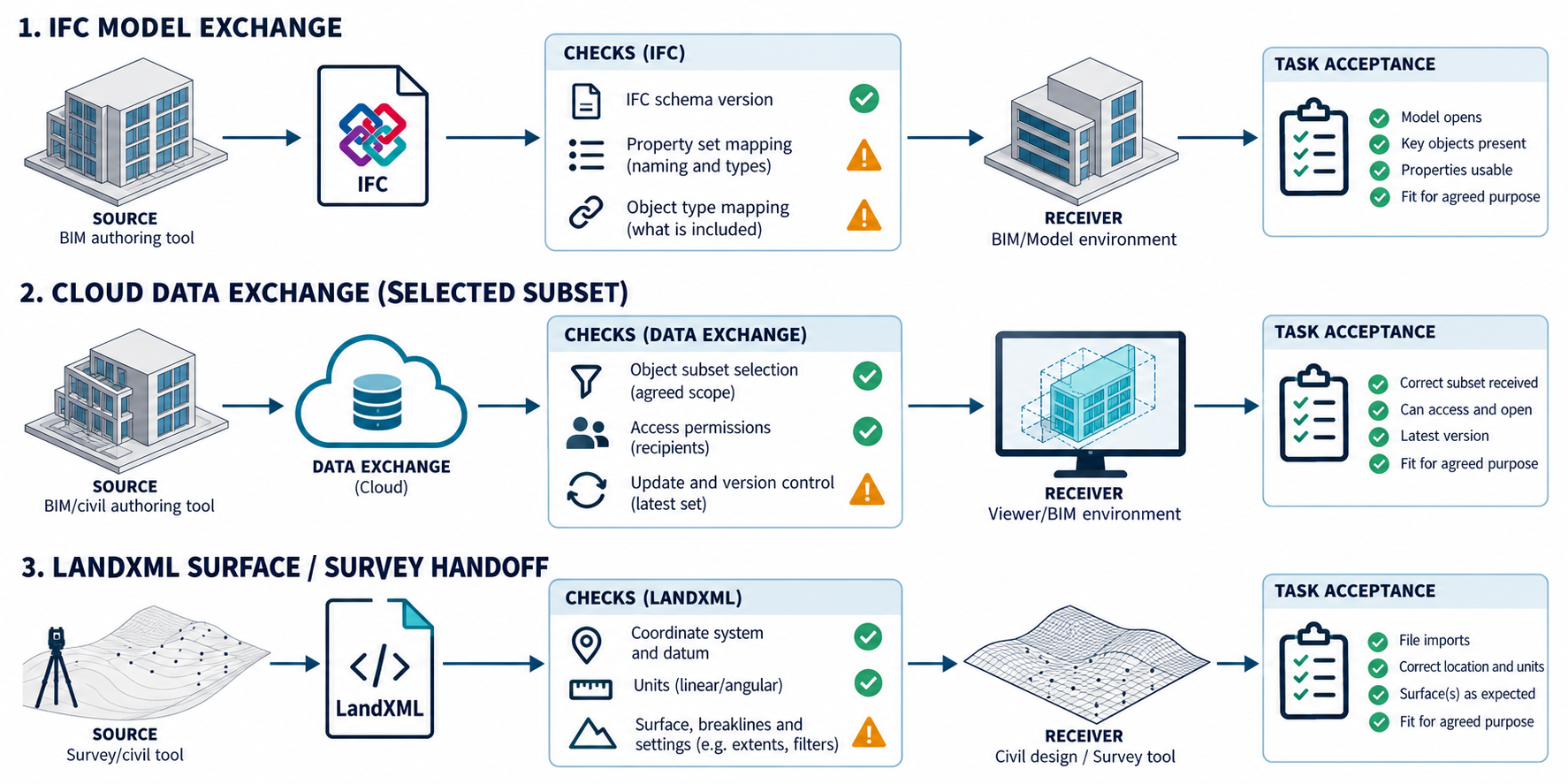
Compare the route families
| Route | What the documented route provides | A useful fit | What still needs testing |
|---|---|---|---|
| Revit and IFC | Revit documents IFC import and export. IFC4 import is listed as link-only; IFC4, IFC2x3, and IFC2x2 are listed for export. | Sharing building information with an IFC-capable recipient or linking an IFC reference. | The selected model view, object and property mapping, linked-file scope, and recipient use. |
| Revit Data Exchange | A cloud-based neutral subset of design data with relevant geometry and properties, exposed through the Revit connector. | Sharing selected model information with a named connector endpoint instead of transferring an entire model. | Endpoint-specific mapping, access, update behavior, and whether the subset meets the recipient’s task. |
| Civil 3D and LandXML | Civil 3D imports and exports LandXML for supported drawing data, including surfaces and survey database data. | Moving civil or site data between Civil 3D drawings and XML-capable applications, including unit or coordinate operations. | Object coverage, units, coordinate transformations, surface definitions, and recipient acceptance. |
These are different payload and collaboration choices. An IFC file is not automatically a complete model exchange; a Data Exchange is explicitly a subset; and LandXML’s support for many Civil 3D objects is not a complete object-mapping promise.
Set the IFC route before export
Name the Revit release, IFC schema or model view, exporter version, phase, visible scope, linked-file policy, and the receiving application. Revit’s export options can change which elements, properties, geometry detail, and links enter the output. Separate IFCs can be produced for linked instances with positioning relative to the host, but Autodesk warns that re-exporting linked IFC files can introduce round-trip data loss.
Revit 2027 adds editable IFC parameter-mapping templates. A team can select a template, duplicate a default mapping, change selected property sets and Revit-to-IFC property mappings, then save or export the mapping file. Keep the chosen template or mapping file with the exchange record. A configured map says what the exporter is set to produce; it does not establish how the recipient interprets those properties.
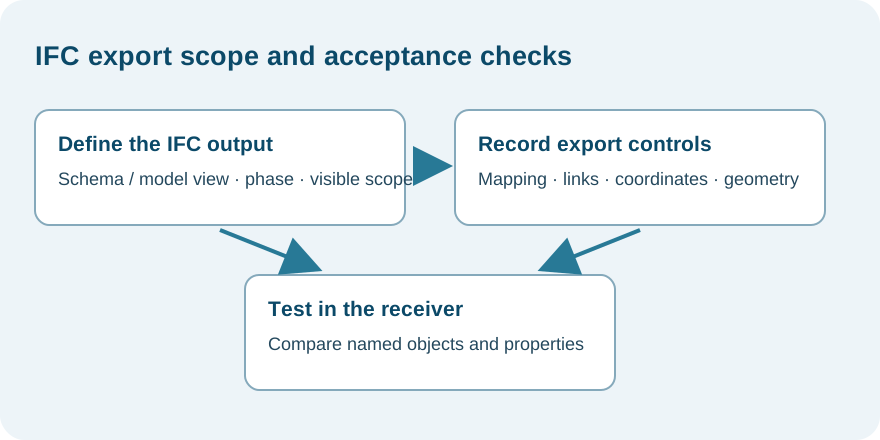
Choose a Data Exchange subset deliberately
Autodesk describes a Data Exchange as a subset of design stored in a neutral cloud format. The Revit connector is documented for named Autodesk and non-Autodesk endpoints, including AutoCAD, Inventor, Civil 3D, Rhino, Grasshopper, Tekla Structures, and Power Automate. The connector is documented for Windows and the ACC and BIM 360 cloud platforms.
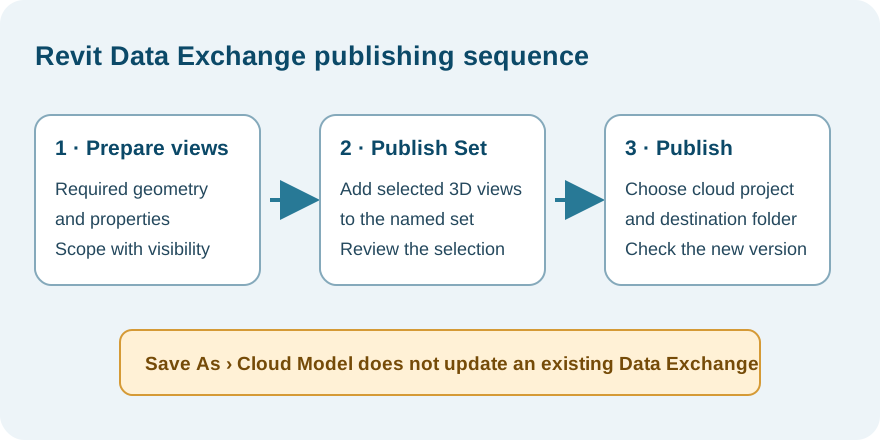
For the documented Revit route, prepare 3D views containing the required geometry and properties, limit their scope with section boxes or visibility settings where needed, add the views to a Publish Set, and publish that set to the intended cloud project and folder. Autodesk says this versions the Revit model and notifies team members; using Revit’s Save As > Cloud Model does not update an existing Data Exchange. This publishing sequence defines the exchange input, not proof that every selected property reaches the receiver.
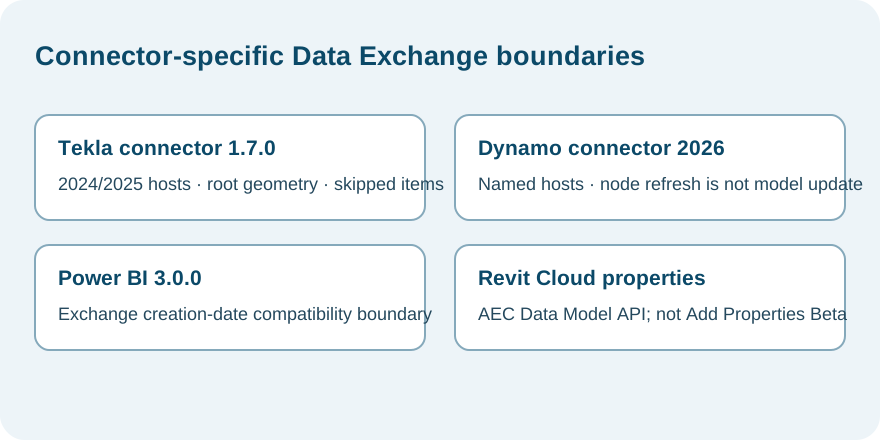
Connector versions add their own boundaries. Autodesk’s Tekla connector 1.7.0 notes name Tekla Structures Desktop 2024 and 2025 host series and describe root-attached geometry and IFC custom-property loading; unsupported items can be skipped while valid exchange data is still created, so inspect warnings and omissions. The Dynamo 2026 connector notes name Dynamo Sandbox 3.6 and Revit 2026.3, and describe refresh for Property Selection and Object Filter outputs; that refresh does not establish automatic model updates. Power BI connector 3.0.0 lists compatibility with Data Exchanges created on or after 2026-07-15, while earlier connector releases are not forward compatible with newer exchanges. Verify current connector and host releases before relying on these version-specific examples.
Revit 2027 Cloud Model extended properties have a separate source boundary: Autodesk documents properties created through the AEC Data Model GraphQL API, but not properties added through Model Coordination Add Properties (Beta). The page does not establish arbitrary property mapping, write-back, or full dataset coverage.
Do not infer that every endpoint has identical property coverage, direction, or update behavior from a connector overview. Confirm the exact source and destination connector, selected objects and properties, cloud project access, update path, and receiving operation. A selected exchange may reduce transfer to relevant information, but it also makes the chosen subset part of the acceptance boundary.
Keep LandXML settings with the civil handoff
Civil 3D documents LandXML 1.0, 1.1, and 1.2 support and describes use for transferring surfaces, exchanging data with XML-capable applications, archiving, converting units, and translating or rotating coordinates. The format label alone does not decide which Civil 3D objects or definitions a recipient will reconstruct.
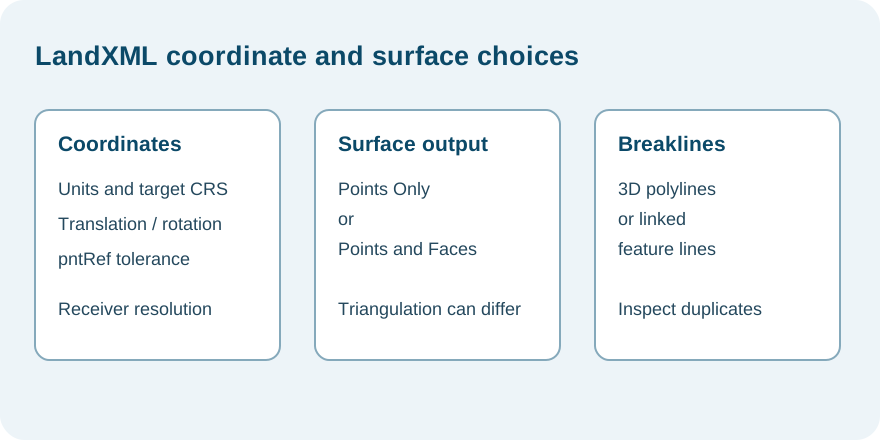
In Civil 3D’s import settings, coordinate translation and rotation use specified base points and target values. Surface import can use a quick point-based route or a full route that uses available points and faces; the quick route may produce different triangulation. Imported breaklines can be created as 3D polylines or as feature lines dynamically linked to the imported surface. Other imported source data may be created in the drawing without becoming part of the surface definition, and a surface-plus-feature-line round trip can create duplicate feature lines.
Before handoff, record coordinate and unit settings, surface import mode, breakline representation, object scope, and any properties that the recipient needs to edit. Inspect the resulting surface and object ownership in the destination rather than accepting only because the file imported.
Civil 3D’s LandXML export settings add another state choice: parcel, alignment, and surface locations may be written as pntRef references to named COGO points when coordinates fall within a selected tolerance. Other locations remain explicit coordinates, so a route can contain both forms. The surface choice also differs: Points Only can yield different triangulation from Points and Faces; breaklines are exported as part of surface data. Record the selected point-reference tolerance and surface output, then inspect how the receiver resolves those objects.
Check cloud-linked IFC versions separately
An IFC file that opens locally and an IFC cloud link are different route conditions. Autodesk’s general Desktop Connector guide describes the path issue with Revit 2026 and earlier when Desktop Connector 2027.x is used. Its specific support article gives the update boundary: Revit 2023 remains affected; Autodesk lists Revit 2024.3.6, 2025.4.6, 2026.4.2, and Revit 2027 or later as resolved. Check the installed builds against that product guidance, then verify the link in the actual project; the release list does not establish project-specific behavior, cause, or recovery. The general guide also says that the change from Autodesk Docs to Autodesk Forma in displayed path prefixes is normally display-only; do not diagnose a broken IFC model from the renamed prefix alone.
Choose the recipient mode and coordination view
The same file label can lead to different receiving behavior. Revit distinguishes live CAD links, which can retrieve saved source changes, from imported snapshots; it also separates vector CAD intake from 3D-shape workflows. Record the selected operation and verify the received representation rather than treating “CAD opened” as native BIM content.
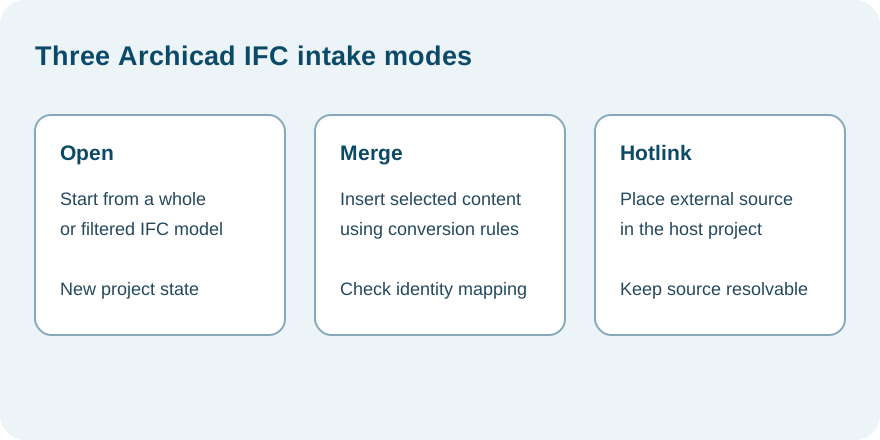
Archicad 29 provides three IFC intake modes. Open creates a project from a whole or filtered IFC model; Merge inserts selected IFC content into the open project and converts it under selected rules; Hotlink places an external source in the host project. During Merge, new Archicad GlobalIds are assigned while the original IFC GlobalId is retained as an External IFC ID. Archicad’s Update with IFC Model command matches equal GlobalIds to update IFC attributes, properties, and classification references when the same mappings are used consistently. It does not reconcile geometry changes or deleted model elements. A Hotlink depends on its source being available to update and on the required libraries; source loss does not remove the placed module, but it prevents refresh. These are three different route states, not interchangeable IFC imports.
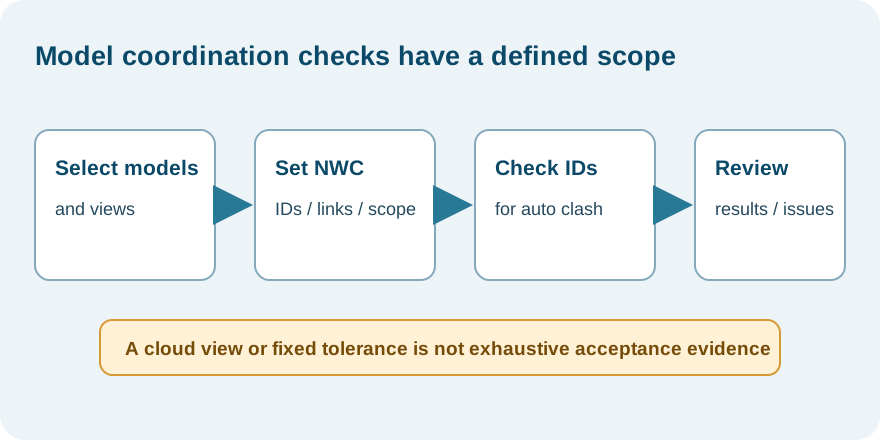
If the receiving job is coordination, select a workflow that establishes the required model set and comparison. Revit’s NWC exporter can affect IDs, parameter scope, links, coordinates, and whether the whole project, current view, or selection is exported; see Navisworks NWD, NWF, and NWC for the detailed checks. Autodesk Model Coordination can aggregate more file types than it has verified for automatic clashes. Automatic clash detection requires stable element IDs; current Data Exchange eligibility also depends on its source application, connector, and creation/update date. Its automatic clash tolerance is fixed at 0.5 mm, and a later tolerance filter does not change the calculation. A cloud coordination view or property-change pane is a scoped review result, not an exhaustive diff, accepted BIM transfer, or clash sign-off.
Keep geospatial and reference branches bounded
InfraWorks’ FGDB export has its own feature, extent, coordinate-system, and layer-mapping decisions. The documented command writes selected supported feature types to a folder, maps them to ArcGIS category/layer names, and stops when the assigned coordinate system is unsupported. Confirm target feature, extent, coordinate system, and receiving layer interpretation; the command’s availability does not establish geospatial equivalence.
Trimble Quadri 2026.2 documents importing a TrimBIM .TRB file, including Revit RVT as an example source for that intermediate. This is not a direct RVT reader or evidence of the resulting model’s mapping. Novapoint 2026.2 documents that Road, Railway, and WS objects produce single-shell solids in Quadri that can be published to DWG as 3D Solids; inspect the actual object set and recipient behavior before using that path.
Connector versions add their own boundaries. Autodesk’s Tekla connector 1.7.0 notes name Tekla Structures Desktop 2024 and 2025 host series and describe root-attached geometry and IFC custom-property loading; unsupported items can be skipped while valid exchange data is still created, so inspect warnings and omissions. The Dynamo 2026 connector notes name Dynamo Sandbox 3.6 and Revit 2026.3, and describe refresh for Property Selection and Object Filter outputs; that refresh does not establish automatic model updates. Power BI connector 3.0.0 lists compatibility with Data Exchanges created on or after 2026-07-15, while earlier connector releases are not forward compatible with newer exchanges. Verify current connector and host releases before relying on these version-specific examples. Revit 2027 Cloud Model extended properties have a separate source boundary: Autodesk documents properties created through the AEC Data Model GraphQL API, but not properties added through Model Coordination Add Properties (Beta). The page does not establish arbitrary property mapping or write-back.
Bentley iTwin synchronization is connector-mediated, so use the supported-formats list for the exact connector and input rather than treating the service as a generic CAD reader. One Revit spatial/level-of-detail configuration is identified in the evidence as testing-only and is excluded from production instructions. Neither connector eligibility nor an intermediate iModel establishes semantic mapping or task acceptance.
Trimble Connect Object Manager can create a TrimBIM reference representation for a selected project file. That reference sits alongside model object data; it does not itself add objects to the Object Manager model. Connect’s format table is client- and workflow-specific. Its LandXML display is based on an Inframodel subset, and the Object Manager help names unsupported LandXML entities that will not display. Treat a visible reference as a scoped coordination view, not a complete or editable civil model.
For a narrower manufacturer-to-building task, use Inventor to Revit: Deliver a Building Component, which covers the RVT simplification, structure, placement, and update path separately.
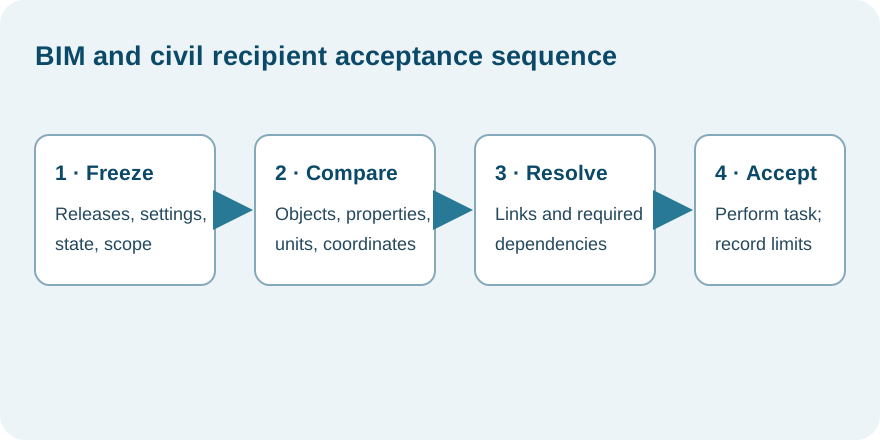
Acceptance checks for any of the three routes
- Freeze the exporting and receiving product releases, schema or connector, options, and intended task.
- Record the elements, properties, surfaces, links, and external dependencies expected in the handoff.
- Verify units, coordinates, model view, property mapping, and any linked or cloud-hosted files.
- Open the result in the actual recipient environment and compare the required objects or properties.
- Perform the receiving task, such as coordinating selected building elements, editing a shared subset, or using a surface in a civil workflow.
- Record omitted, transformed, unresolved, or untested information. Accept only the tested scope.
Key points
- IFC, Data Exchange, and LandXML serve different model and collaboration needs.
- Export settings and subsets are part of route identity.
- Unit, coordinate, link, and receiver checks are as important as file creation.
- Product support and cloud-link guidance do not establish project-specific acceptance.