The BIM Collaboration Format (BCF) carries issue and viewpoint context between BIM applications that share an IFC model. It can help a team discuss a clash, a design question, or a change request without treating the issue file as a replacement for the model itself.
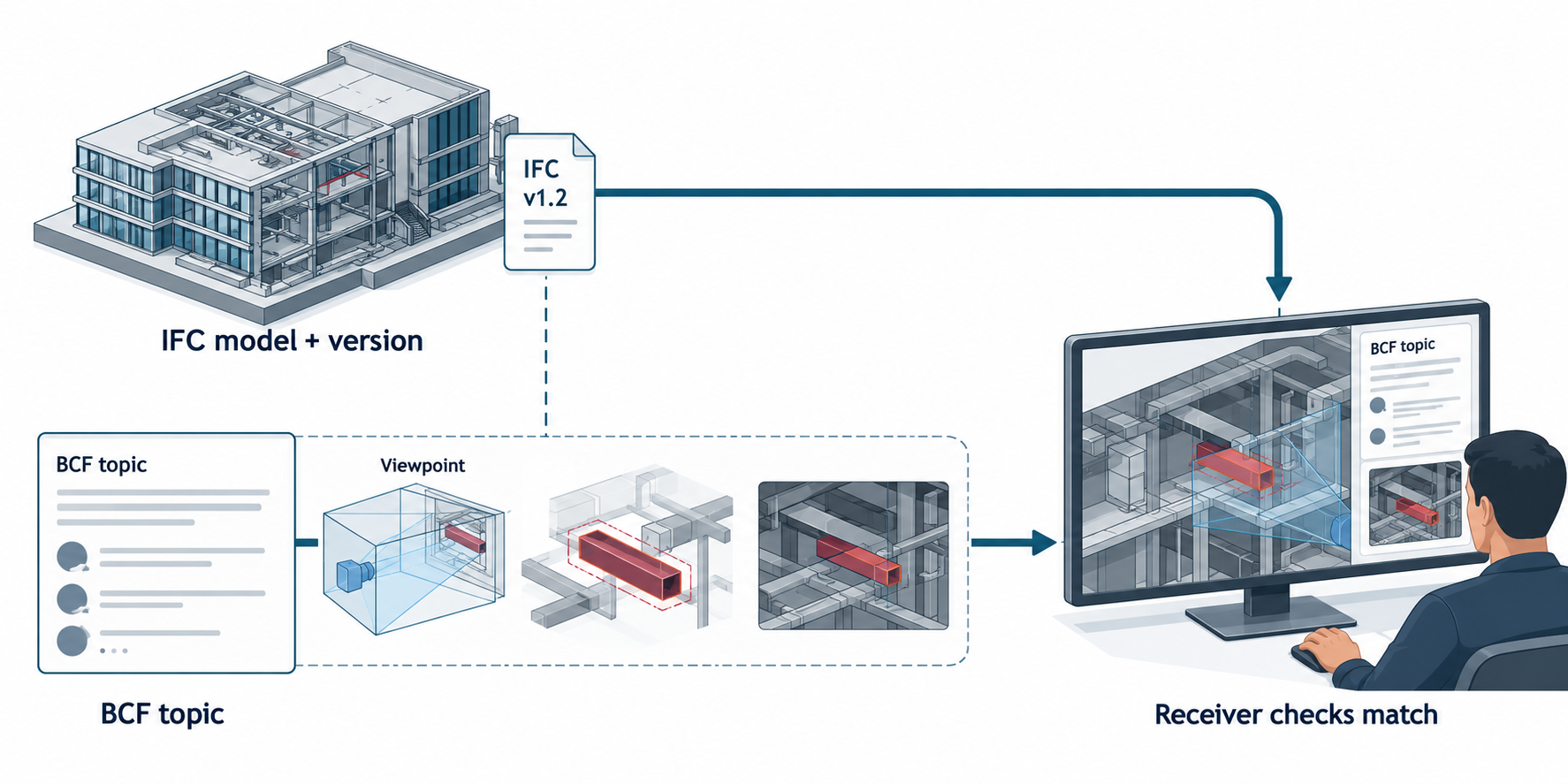
Choose file exchange or a BCF service
The buildingSMART documentation describes two main BCF routes:
| Route | What collaborators exchange | Route condition |
|---|---|---|
| File-based BCF | A BCF file containing project and topic information, markup, viewpoints, snapshots, and optional document references. | Recipients exchange and return the shared BCF file. Keep one authoritative copy; circulating multiple independent copies can break the intended issue round trip. |
| BCF REST API | BCF issues through a web service using HTTP requests and JSON data. A BCF server can manage topics centrally and may be separate from or colocated with a model server. | Confirm each application’s BCF implementation, server behavior, authorization, and secure HTTPS access. |
The file and service routes support issue collaboration. They do not establish a complete transfer of the referenced IFC or CAD model.
Keep the model and the issue context connected
A BCF topic can reference an IFC model and its elements. A viewpoint can carry visual context such as a camera, snapshot, selected or hidden components, coloring, and clipping. BCF documents can also associate files with a topic. These links help a recipient locate the issue in a model, but they do not establish that the receiver has the intended model revision or can match every external reference automatically.
Before sending a BCF issue, agree which IFC model and version is the shared reference. Include or link the necessary model through the project’s chosen model-delivery route, then confirm the receiving application associates the topic with the intended model and element identifiers.
Trimble Connect illustrates why each attachment and saved view needs its own version rule. A topic reference to a project file points to the latest file version in the project; an uploaded file has its own version sequence when the same file is uploaded again; a URL opens a link and does not carry a project file. A saved view can load with the model versions present when the view was created or with the currently used model versions. Record which option was chosen. It identifies the view’s source context, but does not guarantee immutable history or cross-client viewpoint equivalence.
A practical review handoff
- Create the issue or topic in a BCF-capable application and attach the viewpoint or document context needed to understand it.
- Record the IFC model identity and version that the issue references.
- Choose a file exchange or a server-based workflow supported by the participating applications.
- Transfer the BCF file or grant access to the BCF service and its referenced model.
- Open the issue in the receiving application. Check its status, comments, model reference, selected elements, camera, and snapshot.
- Return or update the issue in the agreed authoritative file or server.
For API workflows, the buildingSMART specification calls for secure HTTPS transport and describes authorization controls that an implementation may apply. A protocol rule does not prove that a particular service has been configured correctly; verify project membership and permissions with the service administrator.
Know what BCF does not prove
BCF issue data is not a geometry, topology, feature-history, PMI, or model-editing preservation result. A viewpoint can point to elements in a shared model, but the recipient still needs the correct model and a compatible BCF implementation. Likewise, successful return of a BCF issue file is not proof that the underlying model changed or completed an engineering task.
Use BCF for the conversation and view context around an exchange. Use a separately selected model route for the IFC or CAD data, then test both the model and issue workflow in the receiving environment.
Key points
- BCF exchanges issue context; the referenced model has its own delivery and version requirements.
- File and API workflows have different authority, access, and update conditions.
- Verify model matching and viewpoint behavior in the actual receiving application.