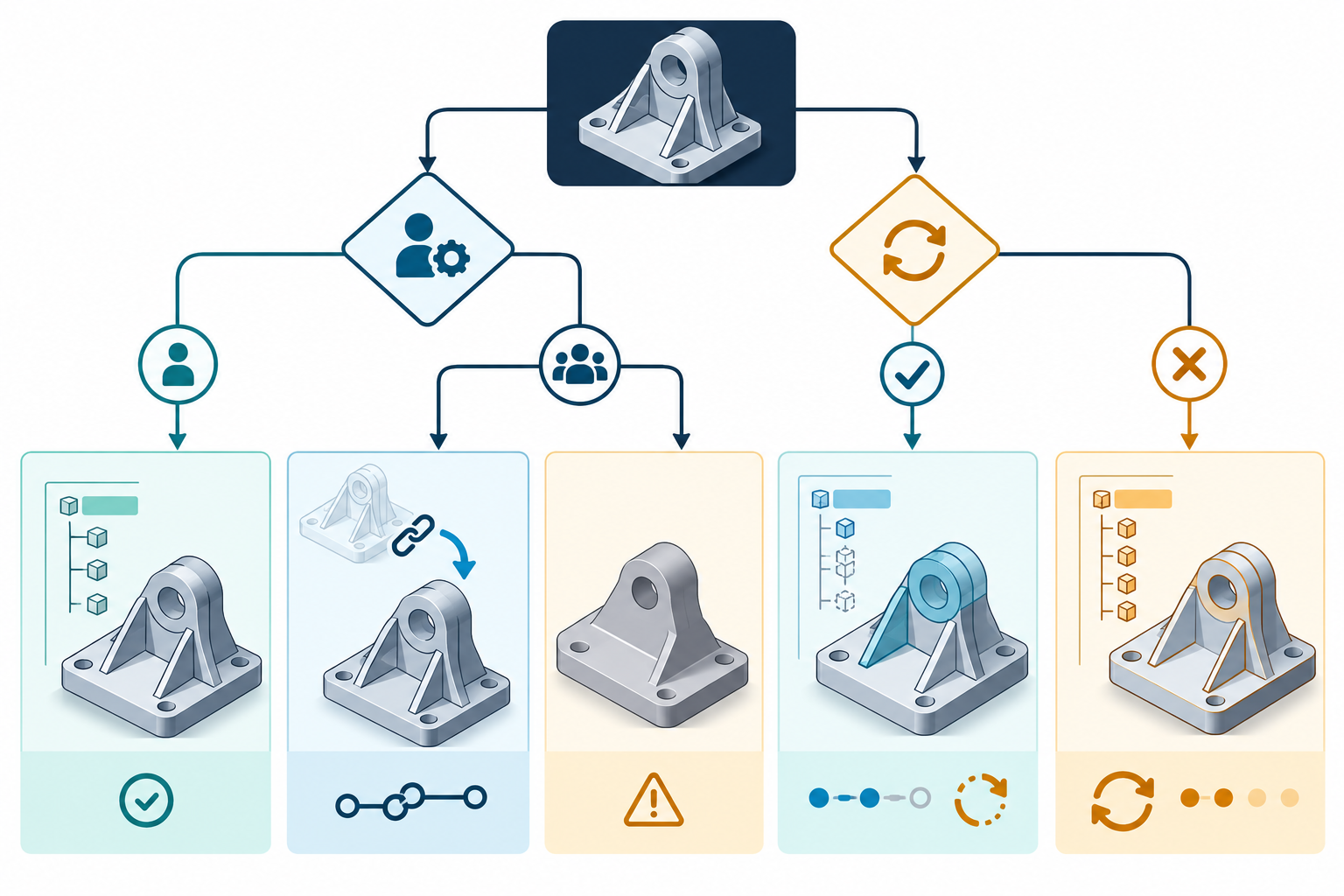
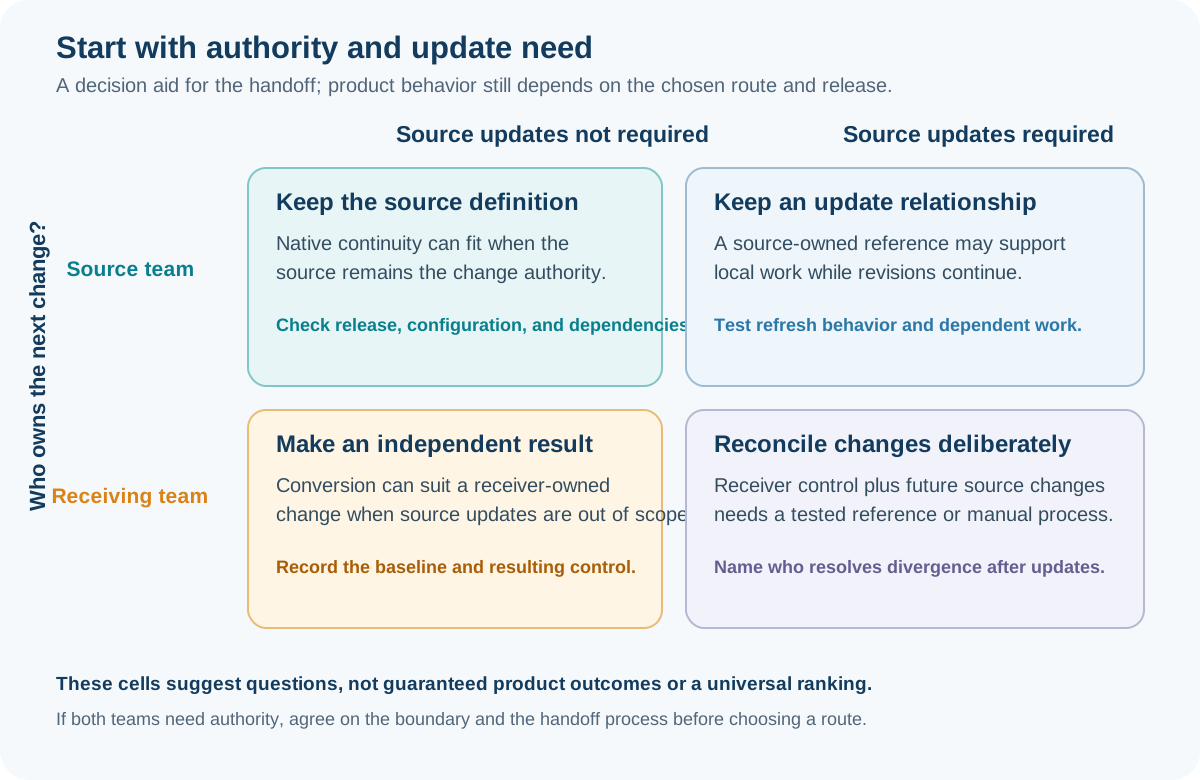
Choose the continuity strategy from the change and update relationship you need, not from the extension alone. The central decision is who owns the next change and whether changes made elsewhere must continue to arrive.
Compare the strategy classes
| Strategy | Change authority | Update behavior | What the recipient can reasonably expect | Main risk |
|---|---|---|---|---|
| Native continuity | The source authoring system or a compatible native workflow | Native dependencies and history remain under that workflow | The direct route when the source definition must remain authoritative, subject to release and configuration compatibility | The recipient may not have the application, release, licenses, references, or authority needed to work independently |
| Linked or referenced model | Usually the source file and its owning system | The destination monitors and incorporates source changes when the link works | A current reference plus destination-side work around it; not necessarily editable source definitions | Missing dependencies, orphaned surfaces, retranslation differences, and edits that are not allowed on the referenced geometry |
| Converted geometry | The destination owns a new independent result | Source and destination changes are separate | A base solid or surface that can be adjusted and extended with destination tools | The original base-feature definition, history, constraints, and associativity may not be editable |
| Selective reconstruction | The destination owns explicitly rebuilt change-driving areas | Updates require an agreed manual or scripted reconciliation unless another link is retained | Parametric control where it was deliberately recreated | The rebuilt portion may diverge from source intent or from unchanged received geometry |
| Full rebuild | The destination owns a new authoring definition | Independent of the source after the handoff unless a separate comparison process is maintained | A model organized for repeated destination-native changes | Reconstruction effort, interpretation errors, and loss of traceability to the received shape |
These are strategy classes, not universal product modes. Product labels such as “reference,” “convert,” “direct edit,” and “interconnect” have to be read in their specific release and file-type context.
Native continuity
Use native continuity when the source authoring system remains the change authority or when the exchange must preserve a feature-based definition for repeated edits. Agree on the application release, required add-ins or references, ownership, and how the recipient will receive updates. A file that is native to the source system may still fail in an earlier release or in a session without its dependencies.
For example, Autodesk’s 2026 Inventor FAQ documents a sequential-version reference workflow: an earlier Inventor release can open a part or assembly from the next release as a reference model, but it cannot access or edit features from the newer release. The earlier release can see later changes after a prompted rebuild. This is a bounded release behavior, not a general rule for every native CAD system.
Linked or referenced models
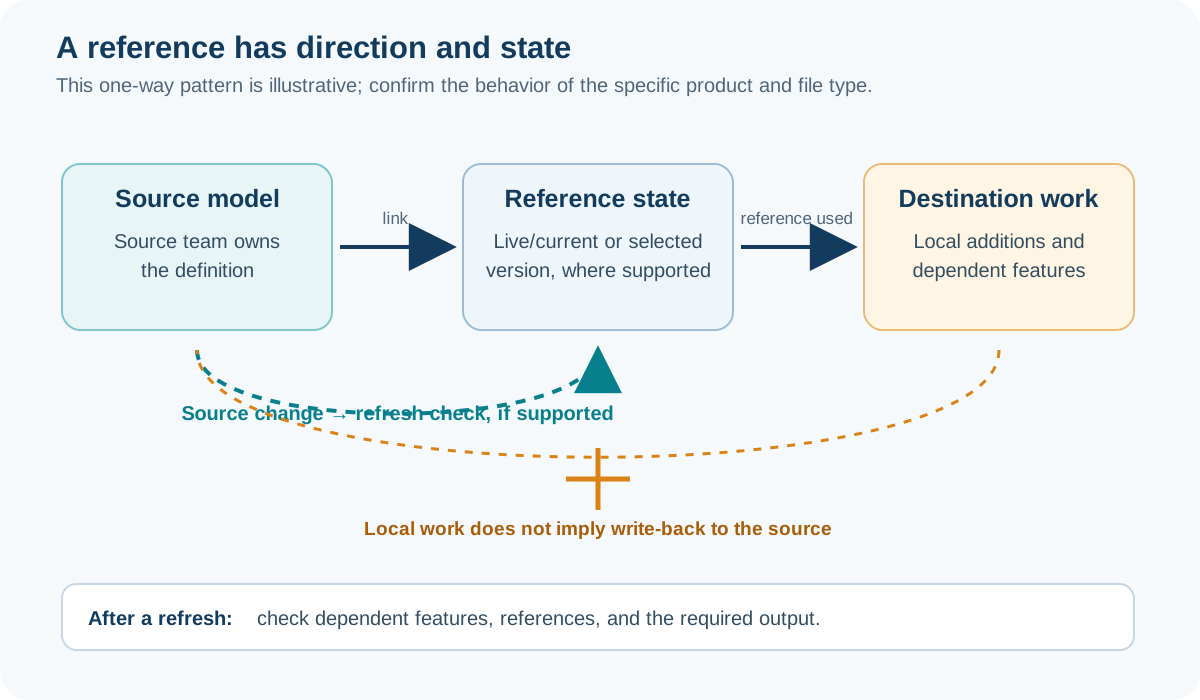
Use a reference when the destination needs current source geometry or context but does not need to edit the referenced definition. Autodesk describes Inventor Reference Model as maintaining a link that can be monitored and updated. Its documentation also limits what can be changed depending on whether the import is in a part or assembly: imported geometry can be edited in a part context, while the imported geometry itself cannot be modified in the documented assembly context.
The link is a dependency, not a guarantee. Autodesk documents that a STEP reference update is a new translation and can create unresolved geometry or prevent Inventor changes from updating correctly. Its association guidance also describes orphaned surfaces when source and destination objects no longer match. Plan for missing files, update ownership, link breakage, and a recovery or acceptance decision.
SOLIDWORKS 2026 describes 3D Interconnect as an associative link for inserting supported proprietary CAD data without converting it to a SOLIDWORKS file, with update and break-link operations. Its format and version table is route context; a listed row does not prove that a particular model supports the required edit or that source history is preserved.
Onshape illustrates why the update scope must be tested rather than assumed. Its documentation says an updated imported part changes the target Part Studio and reapplies target features where possible, but those features can enter an error state. The Assembly is not updated by this workflow and remains at its earlier state. If assemblies or instances matter, make them a separate acceptance check and name the fallback when the Part Studio and Assembly no longer agree.
Onshape’s Derived feature is a separate, bounded master-model workflow: it inserts selected geometry from a base Part Studio into a target Part Studio through a one-way association. Source changes can propagate to the target, while target changes do not update the master. Within the same document, a reference can follow the workspace so changes arrive immediately, or a selected version so updates wait for a new version and an explicit reference update. A source in another document must be versioned. Replacing the derived source can cause later target features to fail. Record which Part Studio is authoritative, the selected workspace or version, and the link direction; then test the update path and inspect dependent target features. Derived is an Onshape reference workflow, not evidence that a cross-system transfer carries source feature history.
Creo Parametric 13 exposes a related set of route-state controls: an imported feature can be reloaded or replaced, original and new geometry can be compared, and reference entities can be matched. Profile options such as import type and ATB are initial-import settings; resetting them during redefinition does not change how the source reload behaves. Record the imported geometry type, configuration, profile, and reference-matching result instead of treating a reload command as proof of continuity.
Creo Unite provides a separate, bounded source-owned reference workflow in Creo Parametric 13. PTC says supported non-Creo models remain associated with their source CAD; it retains source-model names and represents model structure and configurations nearly as accurately as the source systems. Availability depends on supported file families and required collaboration licenses. Destination-side feature edits remain local to Creo. Converting a referenced model creates separate Creo TIM identities, and leaving it unconverted does not write Creo edits back to the source. This describes reference and update authority; it does not establish transferred native feature history or automatic equivalence of engineering intent.
Converted geometry
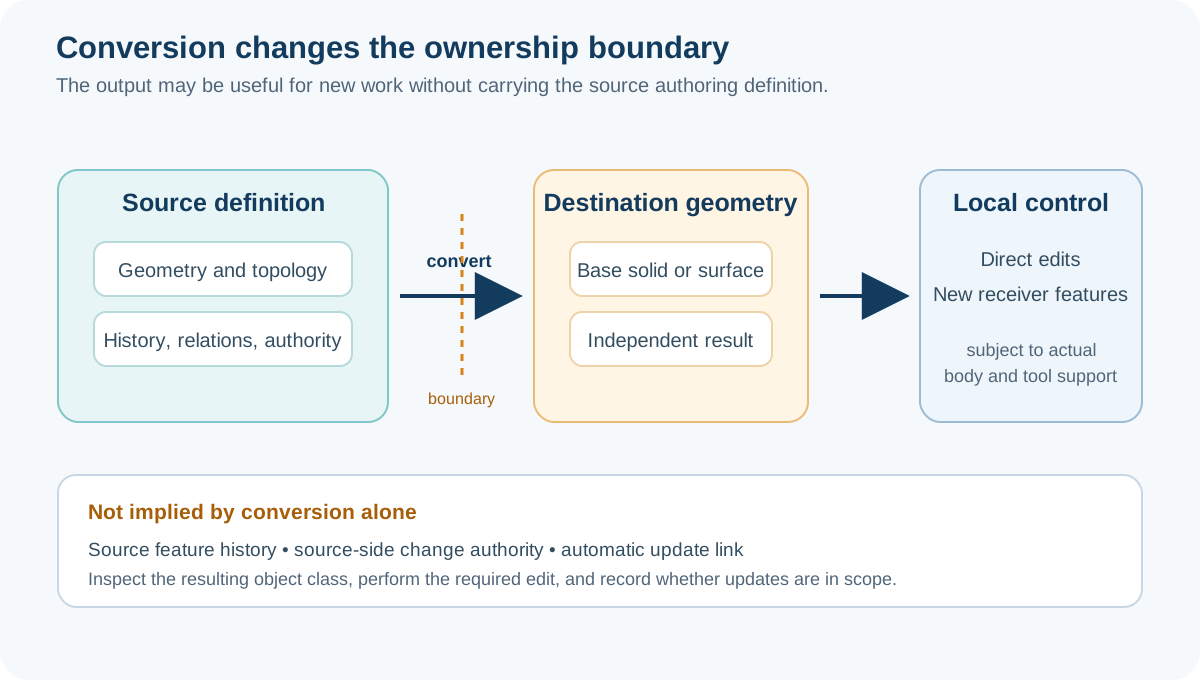
Use conversion when the destination needs independent geometry for a new design, and a source update relationship is not required. Autodesk’s AnyCAD Convert Model creates a new Inventor file that is not linked to the original. The resulting base features can represent source geometry and topology, and destination commands can adjust them or add new features, but the original base-feature definition is not thereby an editable source history.
Record the import mode, filters, units, assembly or part option, source and destination releases, and translator report. In Inventor 2026, object filters distinguish solids, surfaces, meshes, graphical PMI, wires, work features, points, and UCS; the documentation says mesh data is for visualization only. Such filters affect what is available to edit later.
Autodesk Fusion documents another destination-side boundary. Parametric Modeling Mode records features and relationships in a timeline, while Direct Modeling Mode does not capture them as parametric history. A Base Feature permits direct edits inside a parametric design, but those edits are not tracked parametrically; switching back from Direct Modeling captures the result as one Base Feature rather than reconstructing individual history. Treat the selected mode as part of the continuity decision, not as a neutral presentation setting.
Selective reconstruction or a full rebuild
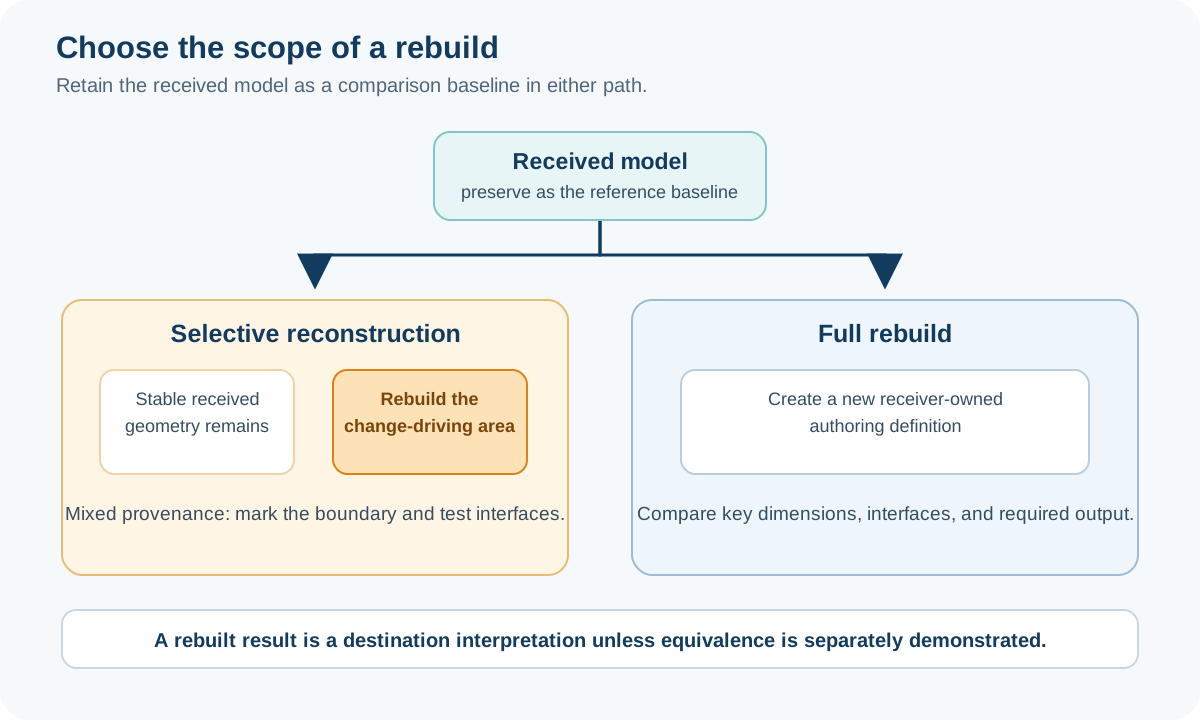
Rebuild when the receiving team needs independent, repeated, or extensive control that the imported representation cannot provide. PTC’s Creo guidance gives two useful patterns: recreate the entire model parametrically when geometry must change extensively or often, or recreate only important portions that change frequently. The selective option limits parametric functionality to those portions; the documentation does not provide a universal cost threshold.
A selective rebuild often preserves a stable received shape while rebuilding the mounting interface, change-driving sketch, or other high-variation region. Keep the received file, identify what was rebuilt, and verify the resulting model against the required dimensions, dependencies, and downstream output. Treat the new definition as a destination interpretation unless equivalence to the source is specifically demonstrated.
A decision sequence
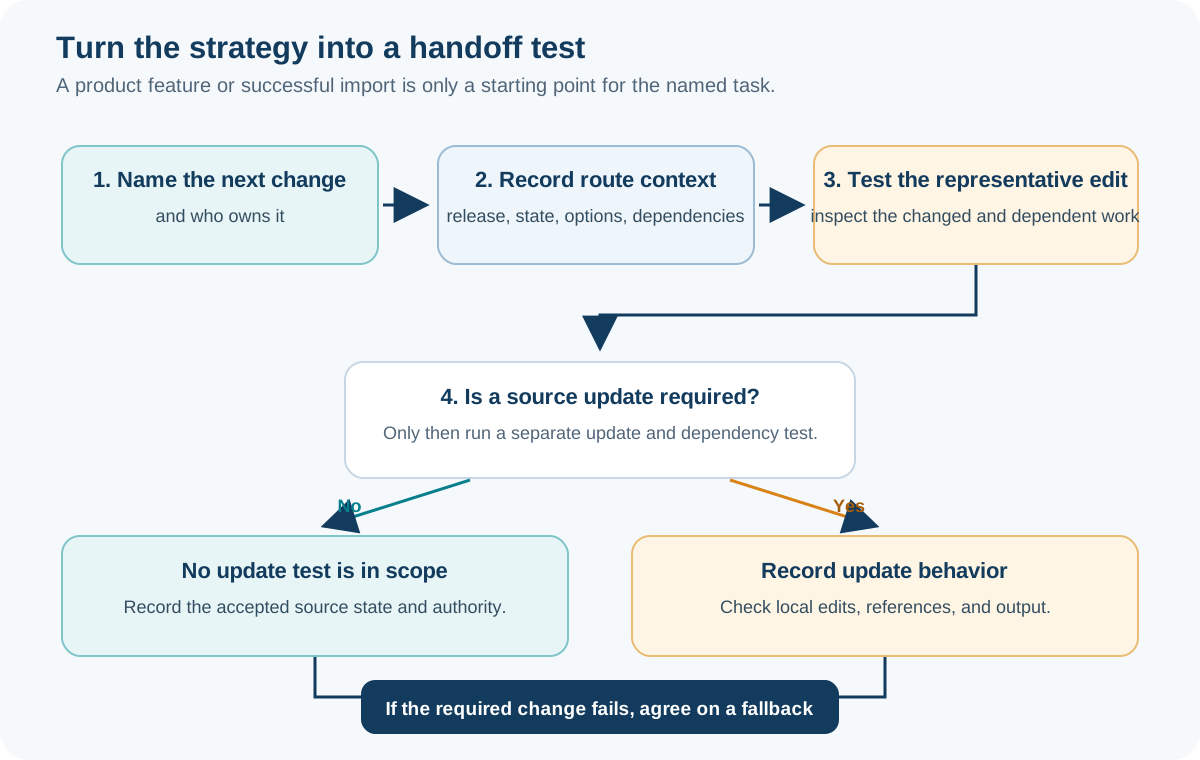
- Name the next change and who must perform it.
- Decide whether source updates are required, optional, or forbidden.
- Identify the information layers that must remain controllable: geometry, constraints, configurations, assembly references, PMI, or other semantics.
- Select native, referenced, converted, selective-rebuild, or full-rebuild handling.
- Capture release, direction, file type/profile, import options, dependencies, and logs.
- Run the representative editability acceptance tests, including an update test only when the route requires one.
Some inputs need a more specific choice before this general sequence applies. For sampled geometry, decide whether to retain a reference, edit the supported mesh representation, convert it, or rebuild from sections in From Scan or Mesh to Editable CAD. For an IFC handoff, decide whether reference use or receiver-native objects serve the task in IFC Editability in BIM.
Key points
- A live link solves an update problem, not automatically an edit-authority problem.
- Converted geometry supports independent destination work but does not imply editable source history.
- Rebuilding is a valid interoperability outcome when control and ownership matter more than preserving the original definition.
- Every strategy needs a defined fallback for missing references, failed updates, or a change that the received representation cannot support.